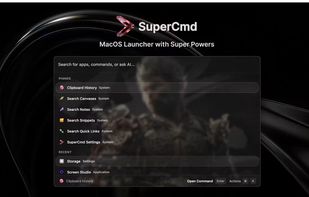

SuperCmd
Open-source launcher for macOS with Raycast-compatible extensions, voice workflows, and AI-native actions.
Cost / License
- Free
- Open Source (MIT)
Platforms
- Mac
- Homebrew
Features
Properties
- Privacy focused
Features
- Dark Mode
- Extensible by Plugins/Extensions
- No registration required
- Ad-free
- Text to Speech
- No Tracking
- Application Launchers
- File Search
- Voice dictation
- Dictation
- AI-Powered
- Built-in AI Assistant
- Built-in Note Taker
- Support for Keyboard Shortcuts
- Freeform notes
- Speech Recognition
Raycast Integration
SuperCmd News & Activities
Recent activities
- POX added SuperCmd as alternative to Microsoft PowerToys, Vicinae, Flow Launcher and Alfred
- POX updated SuperCmd
- POX added SuperCmd
SuperCmd information
What is SuperCmd?
Open-source launcher for macOS with Raycast-compatible extensions, voice workflows, and AI-native actions.
Open-source launcher for macOS: Raycast + Wispr Flow + Speechify + Memory + AI in one app.
SuperCmd gives you Raycast-style extension workflows, hold-to-speak dictation, natural text-to-speech, AI actions backed by configurable providers and memory, notes, canvas, clipboard history, snippet expansion, and window tiling — all from a single keyboard shortcut.
What it is?
SuperCmd is an Electron + React launcher that focuses on Raycast extension compatibility while remaining community-driven and open source. It ships a full @raycast/api and @raycast/utils compatibility shim so existing Raycast extensions work without modification. For anything that requires tight system integration — hotkeys, window management, speech recognition, clipboard, snippet injection — it drops into Swift and Objective-C to talk directly to macOS frameworks (ApplicationServices, EventKit, AVFoundation, Carbon) for native speed and reliability.
Key features:
- Raycast extension compatibility — @raycast/api and @raycast/utils shims; install extensions directly from the Raycast store
- Raycast backup import — import encrypted .rayconfig backups with settings, hotkeys, extensions, scripts, quicklinks, snippets, notes, and extension prefs
- AI cursor prompt — inline AI suggestions at your cursor position across any app
- AI chat — chat with configurable providers (OpenAI / Anthropic / Ollama / Gemini / OpenAI-compatible)
- Hold-to-speak dictation — Wispr Flow-style voice input; hold hotkey, speak, release to type (Whisper, Parakeet, or native macOS STT)
- Read aloud — Speechify-style TTS for selected text (Edge TTS or ElevenLabs)
- Clipboard history — full clipboard manager with Cmd+1–9 quick-paste shortcuts
- Snippet expansion — create and trigger text snippets with keyboard shortcuts
- Quick links — bookmark URLs and launch them from the launcher
- Notes — lightweight in-launcher note-taking
- Canvas — freeform drawing and diagramming
- File search — fast indexed file search with protected-roots support
- Calendar/schedule — view today's events from EventKit
- Window tiling — 24 window placement commands (halves, thirds, quarters, center, fill, 10px nudge/resize)
- Hyper key — remap Caps Lock to a custom modifier with configurable behavior
- System commands — Sleep, Restart, Lock Screen, Log Out, Close All Apps, Empty Trash
- Script command support — run custom shell/Python/Ruby scripts from the launcher
- Auto-updates — built-in updater via GitHub Releases; check manually or install on next launch
- Memory-aware AI — Supermemory integration
- Glassy UI — liquid-glass morphism with custom background image, blur, and opacity controls
- Localization — English, Chinese (Simplified/Traditional), Japanese, Korean, French, German, Spanish, Russian