

StatementTable icon
StatementTable icon

StatementTable

Checks every row of a bank statement against the balances the bank printed, flags the ones that don't reconcile in an Excel review workbook, and builds every export from the workbook you approve.
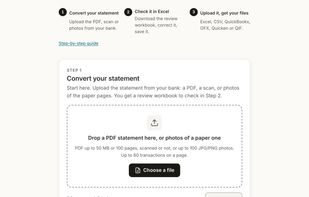
Upload a bank or credit card statement as a text PDF, a scan or a phone photo. No account is needed to convert.

Cost / License

  • Freemium (Pay once or Subscription)
  • Proprietary

Application type

Platforms

  • Online
  • Software as a Service (SaaS)
0likes
0articles
Save

Features

Properties

  1.  Privacy focused

Features

  1.  No registration required
  2.  Ad-free
  3.  Support for multiple currencies
  4.  OCR
  5.  Convert PDF to Excel document
  6.  Bookkeeping

StatementTable News & Activities

Highlights All activities

Recent activities

StatementTable information

  • Developed by

    StatementTable
  • Licensing

    Proprietary and Freemium product.
  • Pricing

    One time purchase ranging between $9 and $79, and / or subscription ranging between $19 and $49 per month + free version with limited functionality.
  • Alternatives

    5 alternatives listed
  • Badge

    Get an embeddable badge for StatementTable
  • Supported Languages

    • English

AlternativeTo Categories

Business & Commerce, Office & Productivity
StatementTable was added to AlternativeTo by statementtable on and this page was last updated .

No comments or reviews, maybe you want to be first?

Official Links

What is StatementTable?

StatementTable is a tool that corrects discrepancies between a bank statement and your books. It checks each row against the bank's balances and flags any inconsistencies. The tool generates Excel, CSV, QBO, OFX, QFX, and QIF files from a review workbook, which you can approve and correct.

The tool can read text PDFs, scanned statements, and phone photos from banks that print a transaction table in UK, EU, Australian, and Turkish layouts. It rebuilds the running balance from the opening balance, compares it with every balance the statement printed, and flags any discrepancies. Statements printed newest first are detected and exported in date order.

The first output is a review workbook, an Excel file with a Check column and a Statement details sheet. You correct the flagged cells, re-upload the workbook, and all export formats are generated from the approved file. Re-uploading the workbook does not cost any pages.

Export formats include Excel (XLSX), CSV, a three-column CSV for accounting imports, QuickBooks (QBO), OFX for Xero, MYOB, and most accounting software, Quicken (QFX), and QIF.

Your file is held only during the conversion and no copy is kept. Our AI provider deletes the data it receives within 30 days and does not train on it. No account is required to convert or buy a page pack.

StatementTable is designed for bookkeepers, accountants, and small businesses needing transactions in a spreadsheet, or in QuickBooks, Xero, Quicken, MYOB, or Sage, especially when bank feeds do not reach far enough back or the statement exists only on paper.

StatementTable Videos