





Offline Bank Statement Converter
Like
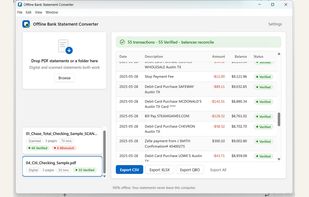
Convert PDF bank statements to CSV, Excel and QBO — 100% offline, every row verified against the statement's printed balances. One-time price, no subscription.

Cost / License
- Pay once
- Proprietary
Application type
Platforms
- Windows


Features
Highlights All activities
Offline Bank Statement Converter News & Activities
Recent activities
- Mendy-Schonfeld added Offline Bank Statement Converter
- Paul updated Offline Bank Statement Converter
 Mendy-Schonfeld added Offline Bank Statement Converter as alternative to DocuClipper, Accurate Bank Statement Converter, BANKTRUST, StatementTable and 4 more

Developed by
 alchemforge
 Licensing
Proprietary and Commercial product.Pricing
One time purchase (perpetual license) that costs $129.Alternatives
8 alternatives listedBadge
Get an embeddable badge for Offline Bank Statement ConverterSupported Languages


No comments or reviews, maybe you want to be first?