

Space Glider icon
Space Glider icon

Space Glider

 Like

Maps sliding and tilting a SpaceMouse cap to smooth scrolling with adjustable speed and momentum. Pushing, pulling and twisting provide trackpad-style zoom and rotation. It applies only to chosen apps and includes defaults, per-app profiles and remappable movements.
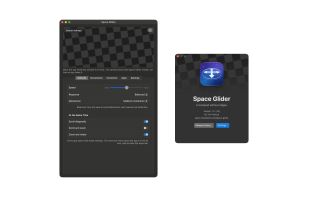
Space Glider screenshot 1

Cost / License

  • Free
  • Proprietary

Since

  • New

Platforms

  • Mac  Requires macOS 14 or later and a 3Dconnexion SpaceMouse
0likes
0articles
Save

Features

Features

Highlights All activities

Space Glider News & Activities

Recent activities

Space Glider information

Space Glider was added to AlternativeTo by Paul on and this page was last updated .

No comments or reviews, maybe you want to be first?

What is Space Glider?

Space Glider is a free macOS menu bar utility that makes a 3Dconnexion SpaceMouse scroll, zoom and rotate content in the apps you choose, the way a trackpad does.

Sliding or tilting the cap scrolls the window under the pointer smoothly, pixel by pixel, with the speed set by how far the cap is deflected and trackpad-like momentum when it is released. Pushing and pulling the cap zooms like a pinch gesture and twisting it rotates; zoom and rotation can run together, and simultaneous scrolling and zooming can be enabled for all apps or only selected ones.

Space Glider only takes over the SpaceMouse in apps that are switched on, leaving other apps and those with native SpaceMouse support untouched, and it works with or without 3Dconnexion's 3DxWare driver. The main window includes a live test canvas, global defaults, per-app settings, and options to remap or reverse each of the cap's six movements. It requires macOS 14 or later and the Accessibility permission, runs on Apple silicon and Intel Macs, and is available in English and German.