
Scrivix icon
Scrivix icon

Scrivix

 Like

Scrivix is an app that transforms your iPad and Apple Pencil into a wireless annotation and control device for your Mac. It is designed for educators, presenters, trainers, and creators, allowing them to draw, highlight, point, scroll, click, and control their Mac during live...
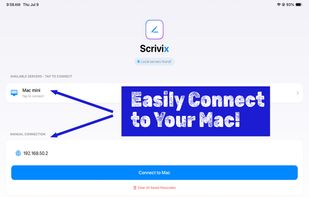
Intro Screen to connect to your Mac (iPad app)

Cost / License

  • Freemium (Pay once)
  • Proprietary

Platforms

  • Mac  Mac app must be installed and permissions granted before using Scrivix
  • iPad  Mac app must be installed first.
0likes
0articles
Save

Features

Properties

Features

Highlights All activities

Scrivix News & Activities

Recent activities

Scrivix information

  • Developed by

    US flagScrivix
  • Licensing

    Proprietary and Freemium product.
  • Pricing

    One time purchase (perpetual license) that costs up to $8 + free version with limited functionality.
  • Alternatives

    5 alternatives listed
  • Badge

    Get an embeddable badge for Scrivix
  • Supported Languages

    • English
Scrivix was added to AlternativeTo by Scrivix on and this page was last updated .

No comments or reviews, maybe you want to be first?

Official Links

What is Scrivix?

Scrivix is an app that transforms your iPad and Apple Pencil into a wireless annotation and control device for your Mac. It is designed for educators, presenters, trainers, and creators, allowing them to draw, highlight, point, scroll, click, and control their Mac during live lessons, meetings, screen recordings, and presentations. It works over your local network without needing an internet connection, cloud account, or subscription.

Key features include an ultra-low latency engine for smooth Apple Pencil input, live presentation overlays for annotating over various apps, smart shape recognition for clean geometry drawings, dynamic whiteboards for various backgrounds, simple local pairing with a secure 4-digit passcode, control mode for Mac control from iPad, and advanced presentation tools such as a fading laser pointer and translucent highlighter.

Scrivix prioritizes privacy by communicating solely over your private local area network, with no data sent to external cloud servers. It requires a free Mac companion app to function, which is available at scrivix.us and must be running on the same local network as your iPad.

The system requirements for the iPad include iPadOS 17.0 or later and compatibility with Apple Pencil Pro, Apple Pencil (2nd generation), and Apple Pencil USB-C. The Mac companion app requires macOS Ventura, Sonoma, or Sequoia and is compatible with Apple silicon Macs.
