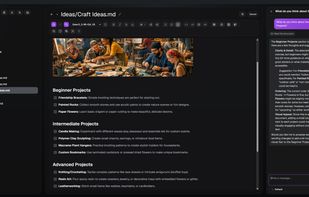
ScribeDog is a native desktop Markdown editor that renders your writing as a polished, WYSIWYG document — no raw # or * syntax in sight — while keeping every file a plain, portable .md file on disk.
Built-in AI assistance can rewrite, extend, translate, spell-check, or generate text on request, either fully offline with a local model (Ollama, Jan.ai, LM Studio) or with a cloud provider of your choice (OpenAI, Anthropic, Mistral) using your own API key — cloud use is strictly opt-in and never automatic. Every AI suggestion goes through a side-by-side review widget before it touches the document, and each accepted edit is a single, fully undoable step.
Beyond simple rewriting, an agentic AI chat panel can read the open document or files you drag in, search across your whole notes folder via an optional local knowledge base, and propose edits through tool calls — always reviewed before anything changes. Custom assistants let you save reusable system prompts for recurring tasks.
Other features include wiki-style linked notes with backlinks, automatic local version history with diff and restore, offline voice dictation powered by whisper.cpp, import from Word, PDF and HTML (including AI-powered OCR for scanned images), export to PDF, DOCX, ODT or HTML, flexible file management with live filesystem sync, light/dark themes, 10 interface languages, and fully remappable keyboard shortcuts.
ScribeDog is fully open source under the MIT license, collects no telemetry, and is built with privacy as a first principle: the only network calls are to the AI endpoint you explicitly configure and an optional, disableable update check.






 EU
EU


 snooky234

