

Screen Slinger
Screenshot tool for Windows 10 and 11 that lets users capture regions or scrolling pages and add editable annotations, arrows, callouts, and auto-numbered steps. Save undo history, securely redact images, works fully offline, no telemetry, supports multiple languages.
Features
Properties
- Privacy focused
Features
- No Tracking
- Full-page Screenshot
- Works Offline
- Annotate Screenshot
- Dark Mode
- Ad-free
- Portable
- No registration required
- Image Annotations
Screen Slinger News & Activities
Recent activities
- shimon_barav updated Screen Slinger
- shimon_barav added Screen Slinger
- Fla updated Screen Slinger
shimon_barav added Screen Slinger as alternative to Snagit, ShareX, Greenshot and Flameshot
Screen Slinger information
What is Screen Slinger?
Screen Slinger is a Windows screenshot tool built for explaining a screen, not just grabbing one.
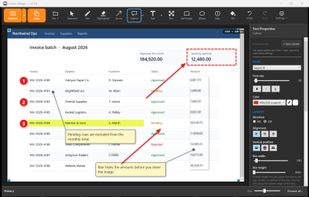
Capture a region - hovering suggests the window, panel or table under the cursor - or let the automatic scrolling capture scroll a long page for you: it stops at the bottom by itself, keeps sticky headers from repeating, and stitches everything into one tall image. Mark it up with arrows, shapes, text, speech-bubble callouts, auto-numbered step markers, a spotlight, a magnifier and emoji stickers. Every annotation stays an editable object - close the file, reopen it next week, and you can still move, restyle or delete anything, because the undo history is saved alongside the image.
Blur, pixelation and solid fill genuinely replace the pixels in the exported file rather than covering them, and one click suggests hides for detected e-mail addresses and long numbers, with reusable hide-templates for screens you capture every day. Text can be copied out of a capture via the OCR engine built into Windows.
It runs entirely locally: no account, no upload, no telemetry. The only network request it ever makes is a licence-key check at activation. It ships as a single self-contained, digitally signed executable with no installer, and the interface follows the Windows display language automatically, in English, French, German or Hebrew with full right-to-left layout.
It does not record video and offers no cloud sharing - a capture-and-annotate tool only, for Windows 10 and 11.


