Satu icon
Satu icon

Satu

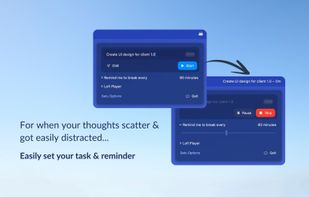
Enhance focus on one task at a time with gentle reminders, Lofi music, and detailed session tracking. Set custom timers, choose notification or blocking reminders, play random or favorite tracks, and manage rest alongside tasks all from the Mac menubar.
Satu screenshot 1

Cost / License

  • Free
  • Proprietary

Application type

Platforms

  • Mac
5likes
0articles
Save

Features

Properties

  1.  Privacy focused
  2.  Lightweight
  3.  Minimalistic

Features

  1.  Works Offline
  2.  No registration required
  3.  No Tracking
  4.  Ad-free
  5.  Reminders
  6.  Sits in the menu bar

Satu News & Activities

Highlights All activities

Recent News

No news, maybe you know any news worth sharing?

Share a News Tip

Recent activities

  • Idus icon
    Nadir-Miry added Satu as alternative to Idus
  • OmmiQ icon
    Dennis added Satu as alternative to OmmiQ
  • Plannr icon
    parkoreda added Satu as alternative to Plannr
  • Kotidy icon
    blev added Satu as alternative to Kotidy
  • LifeDesk icon
    Arthur Brown added Satu as alternative to LifeDesk
  • Agendula icon
    ralaud added Satu as alternative to Agendula
  • Focuslio icon
    Amompharetus added Satu as alternative to Focuslio
  • Veritask icon
    veritask added Satu as alternative to Veritask
  • Nudge Me! icon
    t-pawornprat added Satu as alternative to Nudge Me!
  • Tasks.txt icon
    Paul added Satu as alternative to Tasks.txt

Satu information

AlternativeTo Category

Office & Productivity
Satu was added to AlternativeTo by Paul on and this page was last updated .

No comments or reviews, maybe you want to be first?

Official Links

What is Satu?

Your cozy productivity companion, keep your focus on a single task with gentle reminders and a Lofi track to ease you into the flow.?

All from the comfort of your Mac’s menubar.

Set your own focus time & choose your own reminder type, a common notification or blocking screen view you won't miss! Easily play random Lofi tracks on YouTube, or put your favorite here.

No idea what to do? Just start the session without put a task name, the session will start by showing the time only. However, you can track everything from your single task you are about to do, the rest time on that task, even when you're chill… So that you don't over do in everything.