
Samsung Keyboard icon

Samsung Keyboard

Enjoy typing with Samsung Keyboard. With the new AI features, text input becomes much easier and convenient.
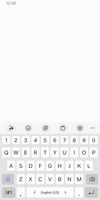
Samsung Keyboard screenshot 1

Cost / License

  • Free
  • Proprietary

Application type

Platforms

  • Android  Samsung only
  • Android Tablet  Samsung only
  • Samsung Galaxy Store
0likes
0comments
0articles

Features

Properties

  1.  Support for Themes

Features

  1.  Dark Mode
  2.  No registration required
  3.  Works Offline
  4.  On-screen Keyboard
  5.  AI-Powered

Samsung Keyboard News & Activities

Highlights All activities

Recent activities

Samsung Keyboard information

  • Developed by

    KR flagSamsung
  • Licensing

    Proprietary and Free product.
  • Alternatives

    4 alternatives listed
  • Supported Languages

    • English

AlternativeTo Category

OS & Utilities
Samsung Keyboard was added to AlternativeTo by 78jmb6dk on and this page was last updated .
No comments or reviews, maybe you want to be first?

What is Samsung Keyboard?

Enjoy typing with Samsung Keyboard. With the new AI features, text input becomes much easier and convenient.

Key features:

• Samsung Keyboard supports over 370 languages. • 'Chat Translation' feature helps you communicate with foreign language messages in your native language. • 'Writing Style' feature allows you to refine your sentences in a casual, polite or professional tone. • 'Spelling and Grammar' feature corrects not only typos but also grammar mistakes. • Voice input can be executed directly from the navigation bar anytime without switching keyboards.

• Smart typing

  • Predictive text: Learns and recommends words/phrases based on what you have entered. Recommended performance is improved through personalized data.
  • Auto spell check: Finds typos and suggests alternative words.
  • Text shortcuts: Add frequently used phrases as shortcuts. You can select the added phrases from the recommendation window and enter them conveniently.
  • Change input language: Swipe left or right on the space bar to change the input language.

• Various Input Methods

  • Voice input and Handwriting recognition are available.
  • Keyboard swipe controls: Use gestures on the keyboard screen to enter text or move the cursor.
  • Split keyboard, floating keyboard, and one-handed input keyboard are supported.

• Contents Input Expressing Yourself

  • Various contents such as stickers, GIFs, and avatars allow you to express yourself beyond text.
  • Emojis: Express yourself in fun and unique ways with over 3,000 emojis.

• Keyboard Customization

  • Long-press the Custom key to open the Option and Symbol list, and select one that you want to assign a shortcut for. (voice input, handwriting recognition, clipboard, emoji, one-handed input mode, keyboard settings, Chinese character input, symbol, etc.)
  • Custom symbols: Save your frequently used symbols and favorite symbols, and use them later. Open the Symbol list by long-pressing the period (.) to easily input symbols.
  • Keyboard size, Number keys, and Alternative characters: You can adjust the keyboard size freely in all four directions, and also decide whether or not the Number keys and Alternative characters should be included on the keyboard.

• Other Features

  • Clipboard: You can select text or images saved in the clipboard, and paste them.
  • Language update: It adds and learns new words on a regular basis. You can update languages via the Keyboard settings.
  • Optimized keyboard layout is provided when using car mode, Samsung DeX, or keyboard cover, and text input using hardware keyboard is supported.

Supported functions may vary depending on the country or the device.
