
S.A.K. Utility icon
S.A.K. Utility icon

S.A.K. Utility

 Like

Free, open-source, portable Windows toolkit for PC technicians: profile backup, partitions, diagnostics, app deployment, USB imaging, and email tools.
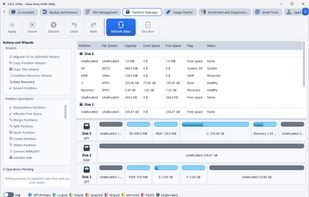
Partition Manager

Cost / License

Application type

Since

  • Since 2025 (updated Nov 2026)

GitHub

  • GitHub stars: 19

Platforms

  • Windows  64-bit only. Built and tested on Windows 11; Windows 10 version 1809 or later meets the minimum.
0likes
0articles
Save

Features

Features

Highlights All activities

S.A.K. Utility News & Activities

Recent activities

S.A.K. Utility information

AlternativeTo Categories

OS & Utilities, Backup & Sync

GitHub repository

  •  19 Stars
  •  0 Forks
  •  0 Open Issues
  •   Updated  
View on GitHub
S.A.K. Utility was added to AlternativeTo by Randy-Northrup on and this page was last updated .

No comments or reviews, maybe you want to be first?

Official Links

What is S.A.K. Utility?

S.A.K. Utility is a free, open-source (AGPL-3.0), portable Windows toolkit for PC technicians, IT pros, and sysadmins. There is no installer: extract the ZIP to a writable folder or USB drive and run sak_utility.exe. It runs as a standard user and asks for administrator rights only when a task needs them.

What's inside:

  • Backup and Restore: guided wizards to move Windows user profiles to a new PC, with optional AES-256 encryption and compression. Backups can include the installed-app list, app data such as browser profiles and Outlook signatures, and WiFi and Ethernet settings.
  • Partition Manager: queue changes and review a before-and-after view before applying them. Resize, move, merge, split, create, delete and format partitions, convert between MBR and GPT, migrate the OS to an SSD/HDD, copy a partition or disk, and recover partitions or data. Format, inspect and browse APFS, HFS+ and ext file systems without a driver.
  • Benchmark and Diagnostics: SMART drive health, hardware inventory, CPU, disk and memory benchmarks, stress tests with temperature monitoring, and HTML, JSON and CSV reports.
  • Application Management: bulk installs from Chocolatey, offline deployment bundles for air-gapped machines, an advanced uninstaller with leftover scans, and a vulnerability scanner that checks installed apps against CISA KEV.
  • Image Flasher: write ISO, IMG and compressed images to USB drives, build Windows ISOs from Microsoft UUP files, and download Linux and recovery images.
  • File Management: tabbed, dual-pane File Explorer, File Organizer, SHA-256 Duplicate Finder, and Advanced Search.
  • Network Management: ping, traceroute, MTR, DNS, port scan, iPerf3 bandwidth, WiFi analysis, adapter settings, and WiFi QR codes.
  • Email Tools: open PST, OST, NST and MBOX archives without Outlook, search and export them, and convert OST, PST or NST to MBOX.
  • AI Assistant (optional): guided repair workflows and service reports using your own OpenAI API key, with access levels you choose.

Settings, chats and reports stay in a data folder beside the program, and there is no telemetry. Requires 64-bit Windows 11 (Windows 10 version 1809 or later meets the minimum but is not part of release testing).