
RenamerX icon
RenamerX icon

RenamerX

RenamerX is an AI file renamer and organizer for macOS and Windows. It uses built-in local AI by default to understand documents, images, and videos without uploading your files. It generates clear, searchable filenames based on their content.
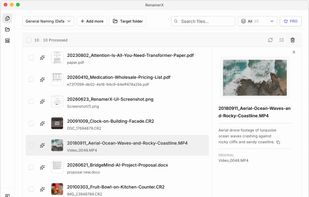
Review original filenames beside AI-generated suggestions before applying a batch rename.

Cost / License

  • Freemium (Pay once)
  • Proprietary

Application type

Platforms

  • Mac
  • Windows
1like
0articles
Save

Features

Properties

  1.  Privacy focused
  2.  AI-Powered

Features

  1.  Batch Rename Files
  2.  Live Preview
  3.  Works Offline
  4.  Built-in viewer
  5.  Dark Mode
  6.  No registration required
  7.  Ad-free
  8.  Automatic file renaming
  9.  File Renaming
  10.  Local AI
  11.  File Organizer

RenamerX News & Activities

Highlights All activities

Recent activities

RenamerX information

  • Developed by

    CN flagSancijun
  • Licensing

    Proprietary and Freemium product.
  • Pricing

    One time purchase (perpetual license) that costs up to $36 + free version with limited functionality.
  • Alternatives

    10 alternatives listed
  • Badge

    Get an embeddable badge for RenamerX
  • Supported Languages

    • English
    • Chinese
    • French
    • Arabic
RenamerX was added to AlternativeTo by Sanci on and this page was last updated .

No comments or reviews, maybe you want to be first?

Official Links

What is RenamerX?

RenamerX is an AI file renamer and organizer for macOS and Windows. It uses built-in local AI by default to understand documents, images, and videos without uploading your files. It generates clear, searchable filenames based on their content.

RenamerX can identify useful details—such as dates, titles, locations, topics, file types, identifiers, projects, and organizations—to help you find files later. For example, video_0001.mp4 can become 20180911_Hawaii_Aerial-View-of-Waves-Crashing-Against-Rocks.mp4.

Custom naming templates let filenames follow your naming convention. Choose which details to include and set their order, separators, date format, and output language.

RenamerX shows the original and new filenames before changing any files. You can edit inaccurate filenames, skip files you do not want to process, and apply the changes once you are satisfied with the results. If needed, undo the renames to restore the original filenames.

RenamerX can also organize files into folders by date, topic, file type, project, or organization. Watch Folders detect new or modified files and can automatically rename and organize them.

RenamerX supports multiple local and cloud AI services. The built-in local AI runs on your device. You can also connect to Ollama, LM Studio, OpenAI, Google Gemini, or another compatible AI service. Data handling depends on the service you choose.

RenamerX Videos
