Redemption icon
Redemption icon

Redemption

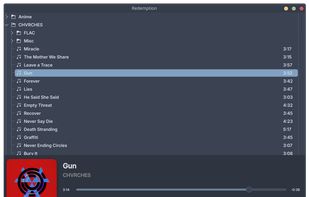
A lightweight music player for KDE/Linux built around your filesystem. Click any song and Redemption plays it, then continues recursively through everything that follows — no playlists to manage, no library to import, just your music and your folders.
Redemption screenshot 1

Cost / License

Application type

Platforms

  • Linux
0likes
0comments
0articles

Features

Properties

  1.  Lightweight
  2.  Privacy focused

Features

  1.  Dark Mode
  2.  Works Offline
  3.  No registration required
  4.  Ad-free
  5.  No Tracking
  6. KDE Plasma icon  KDE Plasma integration
  7.  Sits in the System Tray
  8.  Integrated Search
  9.  QT Based
  10.  Support for Keyboard Shortcuts
  11.  Metadata Editor
  12.  Album shuffle mode
  13.   Support for MPRIS

 Tags

Redemption News & Activities

Highlights All activities

Recent activities

Redemption information

  • Developed by

    IN flagShyam V
  • Licensing

    Open Source (GPL-3.0) and Free product.
  • Written in

  • Alternatives

    51 alternatives listed
  • Supported Languages

    • English

AlternativeTo Categories

Audio & MusicOS & Utilities

GitHub repository

  •  4 Stars
  •  0 Forks
  •  0 Open Issues
  •   Updated  
View on GitHub

Popular alternatives

View all
Redemption was added to AlternativeTo by Paul on and this page was last updated .
No comments or reviews, maybe you want to be first?

What is Redemption?

A lightweight music player for KDE/Linux built around your filesystem. Click any song and Redemption plays it, then continues recursively through everything that follows — no playlists to manage, no library to import, just your music and your folders.

Features:

  • Recursive filesystem playback — play a song, Redemption continues through everything that follows in your library
  • Ambient mode — bottom bar and playlist view adopt colors from the current album art with a blurred background and crossfade transitions
  • Playlist view — a toggleable full-window view with large cover art, ambient blurred background, and a song list
  • Loop modes — loop a single track, directory, specific directory recursively or the full library
  • Shuffle modes — shuffle a single directory, or all your music
  • MPRIS2 — full media key support and taskbar integration
  • Search — fast async search across your entire library
  • Metadata editor — edit tags directly from the player
  • System tray — hide to tray, control from tray menu
  • Lightweight — takes up minimal system resources
  • Cava integration — launch a terminal visualizer with one click

Official Links
