
Popcorn Editor icon
Popcorn Editor icon

Popcorn Editor

 Like

Browser-based editor for posters, labels, packaging and multi-page documents. Create from templates or AI prompts, then adjust layers, text frames and master pages. Print tools cover CMYK, spot colors, dielines, bleed, preflight checks, imposition, and PDF/X export.
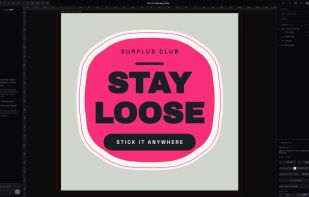
Die-cut sticker with its cut contour, set up in CMYK

Cost / License

  • Freemium (Subscription)
  • Proprietary

Application type

Since

  • New

Platforms

  • Online
  • Software as a Service (SaaS)
0likes
0articles
Save

Features

Properties

Features

Highlights All activities

Popcorn Editor News & Activities

Recent activities

Popcorn Editor information

  • Developed by

    NL flagBrandNewLevel
  • Licensing

    Proprietary and Freemium product.
  • Pricing

    Subscription ranging between $10 and $79 per month + free version with limited functionality.
  • Alternatives

    33 alternatives listed
  • Badge

    Get an embeddable badge for Popcorn Editor
  • Supported Languages

    • English

AlternativeTo Categories

Photos & Graphics, AI Tools & Services

Popular alternatives

View all
Popcorn Editor was added to AlternativeTo by Kiril Nachev on and this page was last updated .

No comments or reviews, maybe you want to be first?

What is Popcorn Editor?

Popcorn Editor is a design editor that runs in the browser and is built for things that get printed: posters, flyers, business cards, stickers, labels, packaging, menus, brochures and books.

Start from a template, describe what you want to the built-in AI assistant, or ask Claude or ChatGPT to build the design through the Popcorn connector. Every result is a normal, editable design with layers, text frames, styles and master pages.

Print production is part of the editor, not an afterthought:

  • CMYK color mode with color-managed PDF/X-4 and PDF/X-1a export
  • Spot colors with overprint and separation preview
  • Bleed, crop and registration marks
  • Dielines and cut contours for stickers and packaging
  • Step-and-repeat imposition
  • Preflight warnings, including low-resolution images
  • QR codes and barcodes

For longer documents there are master pages, automatic page numbers, threaded text frames, columns, facing pages, a table of contents generator and data merge from CSV.

Teams can work in shared workspaces with live collaboration, brand kits and share-by-link.

Export to PDF, PNG, JPEG, WebP, SVG and PPTX.