Plugcam turns an Android phone's camera into a webcam for Windows over a USB cable or Wi-Fi, and it is built to stay out of your PC's way.
Light and fast:
- A 7.2 MB download. About 7 MB of memory waiting in the tray, and under 1% CPU while streaming 1080p30 from there (measured on a Ryzen 7 8845HS laptop).
- The core is native Rust with a small C++ virtual camera. Decoding, rotating, scaling, color adjustments and handing frames to the camera all happen in Rust; the video never goes through a web page.
- The phone encodes H.264 in hardware and Windows' own decoder handles it on the graphics chip.
- No bundled Chromium: the Windows 11-style window is drawn by the WebView2 that comes with Windows (Tauri), and it shuts down completely when Plugcam is in the tray.
Nothing on the phone: Plugcam talks to the phone over USB or wireless debugging and runs the camera part of scrcpy on it only while you stream, then removes it. No app to install, no root.
USB or Wi-Fi: pair the phone once by QR code or a six-digit code, or move a phone on the cable to Wi-Fi with one click. After that it connects by itself whenever it is on the same network, and if the network drops for a moment, Plugcam reconnects while apps keep showing the last picture.
"Plugcam Camera" shows up in desktop apps and browsers that use DirectShow: Zoom, Discord, Telegram Desktop, OBS, Chrome, Edge and Firefox, so browser calls such as Google Meet work too. No OBS or window capture needed.
Also:
- Up to 4K if the phone's camera captures it, at 30 fps, or 60 fps on phones that support it.
- Front or back camera and each lens, zoom presets, flashlight, rotation, mirror, brightness, contrast, saturation and warmth.
- No watermarks, ads, time limits, account or telemetry.
- Installer or portable zip; updates itself. 13 interface languages.
Requires Windows 10 or 11 (64-bit) and Android 12 or newer. Not yet: sound, Microsoft Store apps (such as Windows Camera).
Open source under Apache-2.0.





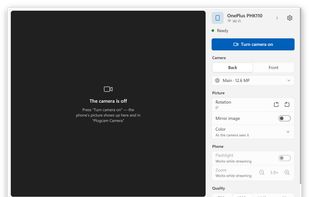


 Maxim-Esipov added Plugcam as alternative to DroidCam, Iriun Webcam, iVCam, Camo Camera and 2 more


No comments or reviews, maybe you want to be first?