rng-lens icon
rng-lens icon

rng-lens

 Like

rng-lens turns an Android phone into a webcam and microphone for a Windows PC. It shows up as a normal camera called "rng-lens" in Zoom, Microsoft Teams, Discord, OBS, Google Meet and any other app, over Wi-Fi with automatic discovery or over USB.
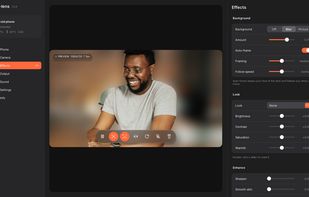
The PC app with background blur and auto-frame on. The glass toolbar over the preview toggles blur, auto-frame, mirror, pause and the phone mic.

Cost / License

  • Free
  • Open Source (MIT)

Since

  • New

Updated

  • Updated Oct 2026

Releases

  • 9 releases last year9 last year

Platforms

  • Windows
  • Android
0likes
0articles
Save

Features

Highlights All activities

rng-lens News & Activities

Recent activities

rng-lens information

AlternativeTo Category

Video & Movies

GitHub repository

  •  0 Stars
  •  0 Forks
  •  0 Open Issues
  •   Updated  
View on GitHub
rng-lens was added to AlternativeTo by rengi-dev on and this page was last updated .

No comments or reviews, maybe you want to be first?

Official Links

What is rng-lens?

rng-lens turns an Android phone into a webcam and microphone for a Windows PC. It shows up as a normal camera called "rng-lens" in Zoom, Microsoft Teams, Discord, OBS, Google Meet and any other app, over Wi-Fi with automatic discovery or over USB.

Everything is free: up to 4K and 60 fps, H.264 or HEVC, every lens the phone exposes, zoom, manual focus, exposure and white balance locks, torch and stabilization.

The PC app adds background blur or a replacement picture, auto-frame that keeps your face in the shot and follows you, colour looks, sharpen, skin smoothing, night mode and exposure that follows your face. All effects run on the PC's graphics card, so the phone stays light and cool.

A heat guard watches the phone's own thermal forecast and lowers fps or resolution before it overheats, then goes back up when it cools down, so long calls don't drop. Streaming keeps going with the phone's screen locked.

A pause button shows a blurred picture with "Be right back", and if Wi-Fi drops the call keeps the last picture with "Reconnecting..." instead of losing the camera. The phone microphone can be streamed too.

Light and dark theme, tray icon, start with Windows, global hotkeys, an optional second phone as a second camera, and updates from inside the app. No ads, no account, no watermark. MIT licensed.