
PlexusTerm icon
PlexusTerm icon

PlexusTerm

 Like

Free, open-source SSH client and terminal for Linux and Windows with AI, SFTP, tunnels, serial and a DEV mode for Claude Code, Codex and OpenCode.
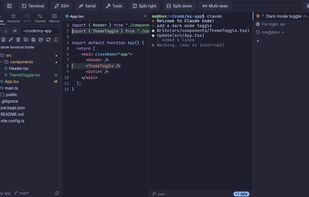
DEV mode: Claude Code in a tab with the project explorer, git status and the file it is editing

Cost / License

  • Free
  • Open Source (MIT)

Application type

Platforms

  • Windows
  • Linux
0likes
0articles
Save

Features

Properties

Features

Highlights All activities

PlexusTerm News & Activities

Recent activities

PlexusTerm information

AlternativeTo Categories

Network & Admin, AI Tools & Services, Development, File Sharing, OS & Utilities, System & Hardware

GitHub repository

  •  0 Stars
  •  0 Forks
  •  0 Open Issues
  •   Updated  
View on GitHub
PlexusTerm was added to AlternativeTo by Jorge Alonso on and this page was last updated .

No comments or reviews, maybe you want to be first?

Official Links

What is PlexusTerm?

PlexusTerm is a free, open-source SSH client, terminal emulator and remote-session manager for Linux and Windows. It brings local shells, SSH, SFTP, port forwarding (SSH tunnels), serial consoles, Telnet and Mosh together in tabs and split panes, with a saved-session library, an SFTP file browser next to each SSH tab, macros and multi-exec to type in several terminals at once.

DEV mode is built for AI coding tools in the terminal. Start Claude Code, Codex, OpenCode, Antigravity or pi in a tab and it becomes a workspace like VS Code: tabs in a column with each tool's icon and a working indicator, a project explorer with git status and the branch, and a file viewer that refreshes live while the AI edits the file. Leave the tool and the tab is a plain terminal again.

An optional AI chat sits under each terminal: select an error, ask why it failed, and run the suggested command with one click. It works with Anthropic, OpenAI, Gemini, OpenCode Go or any OpenAI-compatible server such as Ollama, using your own key. Nothing runs on its own, the terminal output is never sent (only the text you select), and passwords and API keys are stored in the system keyring.

The interface is available in 10 languages: English, Spanish, German, French, Japanese, Portuguese (Brazil), Simplified Chinese, Korean, Arabic (right to left) and Hindi. Packages for amd64 and arm64: .deb, .rpm, tar.gz, .msi and .exe. MIT licence.

