
Planim Time icon
Planim Time icon

Planim Time

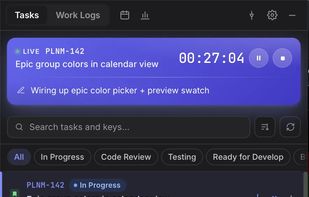
Planim Time Tracker is a menu bar app for logging time on Jira issues without opening the Jira web UI. It lives in the system tray (the menu bar on macOS) and opens a small popover when you click the icon.
Planim Time screenshot 1

Cost / License

  • Freemium (Pay once or Subscription)
  • Proprietary

Platforms

  • Windows
  • Linux
  • Mac
0likes
0comments
0articles

Features

Properties

  1.  Lightweight
  2.  Support for Themes
  3.  Privacy focused

Features

  1.  Task Time Tracking
  2.  No Tracking
  3.  Ad-free
  4.  No Coding Required
  5.  Dark Mode
  6.  Works Offline
  7.  Calendar View
  8.  Reminders
  9.  No registration required
  10.  Sits in the MenuBar
  11.  Offline
  12.  Jira
  13.  Team Collaboration

Planim Time News & Activities

Highlights All activities

Recent activities

Planim Time information

  • Developed by

    RS flagPlanim
  • Licensing

    Proprietary and Freemium product.
  • Pricing

    One time purchase that costs $150, and / or subscription ranging between $7 and $10 per month + free version with limited functionality.
  • Alternatives

    5 alternatives listed
  • Supported Languages

    • English
Planim Time was added to AlternativeTo by JorryGo on and this page was last updated .
No comments or reviews, maybe you want to be first?

What is Planim Time?

Planim Time Tracker is a menu bar app for logging time on Jira issues without opening the Jira web UI. It lives in the system tray (the menu bar on macOS) and opens a small popover when you click the icon. It is built with Tauri and Rust instead of Electron, so the macOS download is about 8.5 MB. It connects to Jira directly using your own API token, which is stored in the system keychain.

  • One-click timer in the menu bar. Pick an issue, then start, pause, resume, and stop. The tray icon shows whether a timer is running, paused, or idle.
  • Worklog management. Push a single worklog or all pending ones at once, add worklogs manually, and see what is pending, synced, or failed.
  • Two-way sync with Jira. Worklogs you log are written back to the issue, and edits made in Jira show up in the app.
  • Your own JQL filter controls which issues appear. Pin issues, reorder statuses, and hide the ones you do not need.
  • Works offline. Everything is stored locally in SQLite and syncs when you are back online.
  • Calendar and timesheet view (week or month) with drag-and-drop worklogs, color coding by issue, and inline editing.
  • Team statistics grouped by person, issue, epic, or project, with estimate vs actual and missing-time reports.
  • Automation: auto-push on stop, status transitions on start and stop, and reminders that detect status changes or prompt you to log time.
  • Multiple JQL filters, CSV export, and daily reports.
