

PlainCapture icon
PlainCapture icon

PlainCapture

 Like

Full-page and area screenshots with annotation, and watermark-free screen recording to MP4 – everything stays on your computer.
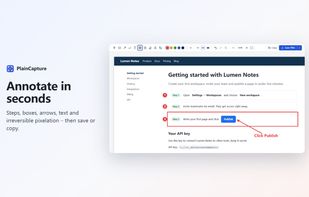
Annotate screenshots: steps, boxes, arrows, text, pen and pixelation

Cost / License

  • Freemium (Pay once or Subscription)
  • Proprietary

Application type

Since

  • New

Platforms

  • Google Chrome
0likes
0articles
Save

Features

Properties

Features

Highlights All activities

PlainCapture News & Activities

Recent activities

PlainCapture information

  • Developed by

    PlainCapture
  • Licensing

    Proprietary and Freemium product.
  • Pricing

    One time purchase that costs $29, and / or subscription that costs $19 per year + free version with limited functionality.
  • Alternatives

    14 alternatives listed
  • Badge

    Get an embeddable badge for PlainCapture
  • Supported Languages

    • English

AlternativeTo Categories

Photos & Graphics, Web Browsers, Video & Movies
PlainCapture was added to AlternativeTo by PlainCapture on and this page was last updated .

No comments or reviews, maybe you want to be first?

Official Links

What is PlainCapture?

PlainCapture is a Chrome extension for screenshots and screen recording that keeps everything on your computer – no account, no uploads, no tracking.

Screenshots

  • Selected area (the page freezes first, so hover menus stay in the shot), visible area, or the full page – long pages, sticky headers, lazy-loaded images and pages that scroll inside a panel.
  • Annotate: boxes, arrows, text, freehand pen, irreversible pixelation, crop. Save as PNG/JPG or copy to the clipboard.

Screen recording

  • Record a tab (with its sound), a window or the whole screen, with microphone and a camera bubble.
  • Saves MP4 or WebM with a working seek bar. No watermark, no time limit, up to 1080p free.
  • A red-dot icon shows you're recording; click it to pause or stop.

Library

  • Everything you capture is in one place with search, names taken from the page title, and rename.

Pro ($19/year or $29 lifetime) adds PDF export, save straight to a folder with your own file names, 1440p/4K and 60 fps recording, numbered steps, highlighter and blur.

