
Pinwork icon
Pinwork icon

Pinwork

Pinwork is a to-do app with native versions for iPhone, iPad, Mac and Apple Watch, and one purchase covers all of them. There is no Pinwork account to create.
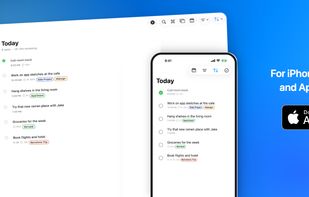
Pinwork on iPhone, iPad, Mac, and Apple Watch

Cost / License

  • Pay once or Subscription
  • Proprietary

Application type

Platforms

  • Mac
  • iPhone
  • iPad
  • Apple Watch
0likes
0articles
Save

Features

  1.  Cloud Sync
  2.  Recurring Tasks
  3.  Calendar Integration
  4.  Reminders
  5.  Dark Mode
  6.  Ad-free
  7.  Works Offline
  8.  Full-Text Search
  9.  No registration required

Pinwork News & Activities

Highlights All activities

Recent activities

Pinwork information

  • Developed by

    PL flagADAPTING.TECH sp. z o.o.
  • Licensing

    Proprietary and Commercial product.
  • Pricing

    One time purchase that costs $80, and / or subscription that costs $5 per month.
  • Alternatives

    51 alternatives listed
  • Badge

    Get an embeddable badge for Pinwork
  • Supported Languages

    • English
    • German
    • Spanish
    • French
    • Italian
    • Japanese
    • Portuguese
    • Chinese

AlternativeTo Category

Office & Productivity
Pinwork was added to AlternativeTo by blankamo on and this page was last updated .

No comments or reviews, maybe you want to be first?

Official Links

What is Pinwork?

Pinwork is a to-do app with native versions for iPhone, iPad, Mac and Apple Watch, and one purchase covers all of them. There is no Pinwork account to create.

It works with the rest of the system: Shortcuts actions and a Focus Filter, Home and Lock Screen widgets, Control Center controls, a Live Activity for focus sessions and Spotlight search. On the Mac there is AppleScript, a menu bar item and a Raycast extension.

Tasks can be turned into Apple Calendar events, and edits made in Calendar show up back in the app. A task is added with one typed line: "Review pitch deck Friday at 2pm #startup" sets the day, the time and the tag. Projects, tags, checklists, time estimates, repeating tasks and separate deadlines are included, and Apple Reminders lists can be imported.

Tasks are stored on the device, work offline, and sync through the private iCloud database of the Apple Account.

