Pilgrim Markdown icon

Pilgrim Markdown

 1 like

Pilgrim Markdown is a fast, offline-first Material Design 3 Markdown editor PWA built for ChromeOS and desktop browsers.
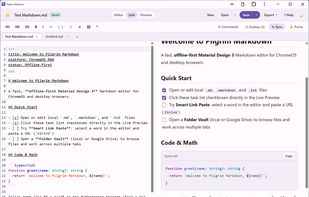
Pilgrim Markdown screenshot 1

Cost / License

  • Free
  • Open Source (MIT)

Application type

Since

  • New

Updated

  • Updated Nov 2026

Platforms

  • Chrome OS
  • Online
1like
0articles
Save

Features

Properties

Features

Highlights All activities

Pilgrim Markdown News & Activities

Recent activities

Pilgrim Markdown information

AlternativeTo Category

Office & Productivity

GitHub repository

  •  1 Star
  •  0 Forks
  •  0 Open Issues
  •   Updated  
View on GitHub

Popular alternatives

View all
Pilgrim Markdown was added to AlternativeTo by Pilgrim on and this page was last updated .

No comments or reviews, maybe you want to be first?

What is Pilgrim Markdown?

Pilgrim Markdown is a fast, offline-first Material Design 3 Markdown editor PWA built for ChromeOS and desktop browsers.

100% Offline & Privacy-First No accounts, no servers, no telemetry, and no external CDN requests. Everything is precached via Service Worker so you can write anywhere, even without an internet connection.

Key Features

  • Beginner-Friendly & Fast: Type "/" anywhere for inline slash-command autocompletion, press Ctrl+/ (or Ctrl+Shift+P) for the Command Palette, or press F1 for a searchable Help & Cheat Sheet with one-click snippet insertion.
  • Powerful Editor & Live Preview: Powered by CodeMirror 6 with Smart Link Paste, synchronized scrolling, clickable task lists, copy buttons on code blocks, YAML frontmatter cards, a clickable Document Outline (H1-H3), and KaTeX math rendering.
  • Multi-Tab Workspace & Folder Vault: Open any local folder or ChromeOS Google Drive folder in the collapsible sidebar explorer, edit multiple documents in tabs with per-tab undo/redo history, quick-switch files with Ctrl+P, and view relative local images inside your vault.
  • Google Drive Cloud Sync: Choose between ChromeOS Native DriveFS Sync (with background change detection and conflict prompts) or Direct Browser Cloud Sync using optional zero-server OAuth 2.0 and the Google Drive API with an offline sync queue.
  • Export & Clipboard: Save directly to .md, export as standalone .html (with embedded CSS and native MathML), print to PDF, or use one-click Copy for Google Docs / Gmail.
  • Reliable & Accessible: Includes multi-window-safe crash recovery drafts, external file modification checks, light and dark Material Design 3 themes, keyboard navigation, and HTML sanitization via DOMPurify.

ChromeOS & Managed Chromebooks Installs directly from Chrome or Edge as a native-feeling PWA with its own Launcher and Shelf icon, Window Controls Overlay, and automatic .md, .markdown, and .txt file association in the ChromeOS Files app. Admins can also deploy it across managed Chromebooks via Google Admin Console.