Peek Compress icon
Peek Compress icon

Peek Compress

Native macOS archive browser: open ZIP, RAR, 7z, TAR and 40+ formats like folders, preview files and extract only what you need.
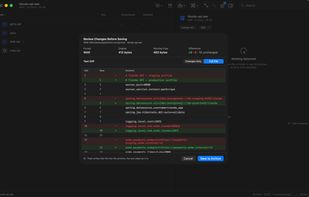
Edit a file inside a .war and review the diff before saving it back

Cost / License

  • Freemium (Pay once)
  • Proprietary

Application type

Platforms

  • Mac  Requires macOS 15.5 or later
1like
0articles
Save

Features

Properties

  1.  Privacy focused

Features

  1.  Works Offline
  2.  Ad-free
  3.  AES-256 Encryption
  4.  Supports RAR files
  5.  Supports Zip files
  6.  No registration required
  7.  Dark Mode
  8.  Supports tar files
  9.  File Compression

Peek Compress News & Activities

Highlights All activities

Recent activities

Peek Compress information

  • Developed by

    SV flagMarlon Coreas
  • Licensing

    Proprietary and Freemium product.
  • Pricing

    One time purchase (perpetual license) that costs $15 + free version with limited functionality.
  • Alternatives

    9 alternatives listed
  • Badge

    Get an embeddable badge for Peek Compress
  • Supported Languages

    • English
    • Spanish

AlternativeTo Categories

File Management, Security & Privacy, OS & Utilities

Popular alternatives

View all
Peek Compress was added to AlternativeTo by Marlon Coreas on and this page was last updated .

No comments or reviews, maybe you want to be first?

Official Links

What is Peek Compress?

Peek opens ZIP, RAR, 7z, TAR and more than 40 other archive formats in a native Mac window, without extracting them first. Browse an archive like a folder, preview any file with Quick Look, search by file name or by file contents, and drag out only the files you need.

Free:

  • Open and browse 40+ formats, including RAR, 7z, ISO (including Windows UDF ISOs), CAB and WIM
  • Preview files without extracting: Quick Look, text, images and code
  • Search by file name or by contents
  • Extract one file, a selection or the whole archive
  • Open password-protected ZIP and 7z archives
  • Create ZIP archives, with a password if you need one
  • Quick Look summaries, custom thumbnails and Finder Quick Actions

Peek Pro (one-time purchase, no subscription):

  • Edit inside the archive: add, move, rename, duplicate and delete entries without unpacking and repacking
  • Change a file inside a .jar, .war, .ear or .zip in place: open it in your editor, review the text diff and save it straight back
  • Compare two archives, or an archive against a folder, and see exactly what changed
  • Verify integrity with SHA-256, export checksum reports and check an archive against a manifest
  • Create and convert to 7z, TAR.GZ, TAR.BZ2, TAR.XZ, TAR.ZST and PAX
  • AES-256 encryption and hidden file names in 7z
  • Batch extract, convert and verify many archives at once
  • Reproducible archives, split volumes, and WIM/SWM split and join for Windows images

Peek is sandboxed and distributed through the Mac App Store. No account, no telemetry; archives are read on your Mac and nothing is uploaded. Requires macOS 15.5 or later.