
PARARI PDF icon
PARARI PDF icon

PARARI PDF

 Like

PARARI PDF is a lightweight PDF viewer with a simple design that blends right into Windows, built to open files quickly and stay responsive even with large documents. The controls fade out while reading, and scrolling, inertia, and pinch-to-zoom stay smooth with a touchpad or...
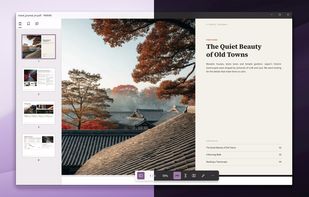
At home on Windows, in light and dark

Cost / License

  • Freemium (Pay once)
  • Proprietary

Application type

Since

  • New

Platforms

  • Windows
0likes
0articles
Save

Features

Properties

Features

Highlights All activities

PARARI PDF News & Activities

Recent activities

PARARI PDF information

  • Developed by

    JP flagNight Breeze
  • Licensing

    Proprietary and Freemium product.
  • Pricing

    One time purchase (perpetual license) that costs up to $15 + free version with limited functionality.
  • Alternatives

    10 alternatives listed
  • Badge

    Get an embeddable badge for PARARI PDF
  • Supported Languages

    • English
    • Japanese
    • Chinese
    • Italian
    • Korean
    • German
    • Spanish
    • French
    • Polish
    • Portuguese
    • Russian
    • Turkish

AlternativeTo Category

Office & Productivity
PARARI PDF was added to AlternativeTo by NightBreeze on and this page was last updated .

No comments or reviews, maybe you want to be first?

Official Links

What is PARARI PDF?

PARARI PDF is a lightweight PDF viewer with a simple design that blends right into Windows, built to open files quickly and stay responsive even with large documents. The controls fade out while reading, and scrolling, inertia, and pinch-to-zoom stay smooth with a touchpad or touch screen.

Free features:

  • Vertical and horizontal scrolling, page flip, and two-page view with right-to-left support
  • Thumbnails, bookmarks, text search and copy, and an annotation list
  • Presentation mode with a presenter view, printing, and opening password-protected PDFs
  • Light and dark themes, and 13 interface languages

PARARI Plus is a one-time in-app purchase with no subscription:

  • Highlights, sticky notes, text boxes, and text written directly on the page, including vertical text
  • Pressure-sensitive pen and highlighter, shapes, stamps, and measuring tools
  • Page deletion, reordering, rotation, redaction, and saving with a password
  • All Plus features can be tried before buying, with saving and printing disabled during the trial

PARARI PDF runs offline with no ads, and does not collect or send usage data or document contents. It is distributed through the Microsoft Store and is not currently available in the EU/EEA.