





PageMark — Private Screenshot & Annotate
Like
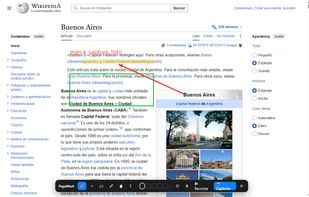
PageMark is a Chrome extension to draw on any web page (pen, arrows, rectangles, highlighter, text notes, one-click censor) and capture the result as a PNG — copied to your clipboard or downloaded. Unlike most screenshot tools, it has no server and no sign-up: every capture...

Cost / License
- Freemium
- Proprietary
Application type
Platforms
- Google Chrome

Features
PageMark — Private Screenshot & Annotate News & Activities
Highlights All activities
Recent activities
- luisdonoso1991 added PageMark — Private Screenshot & Annotate
- Mauricio B. Holguin updated PageMark — Private Screenshot & Annotate
 luisdonoso1991 added PageMark — Private Screenshot & Annotate as alternative to Awesome Screenshot and FireShot

PageMark — Private Screenshot & Annotate information
Developed by
luisdonoso1991Licensing
Proprietary and Freemium product.Pricing
free version with limited functionality.Alternatives
2 alternatives listedBadge
Get an embeddable badge for PageMark — Private Screenshot & AnnotateSupported Languages

No comments or reviews, maybe you want to be first?