





Packet Capture Pro
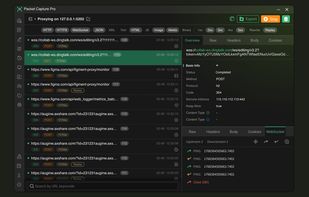
Packet Capture Pro is a professional network analyzer, packet sniffer, HTTP debugging proxy, and API testing tool for Windows, macOS, Android, and iOS. Built for developers, QA engineers, API testers, and network professionals, it helps you capture, inspect, intercept, rewrite...

Cost / License
- Freemium (Subscription)
- Proprietary
Platforms
- Mac
- Windows
- Android
- iPhone
- iPad
- Android Tablet


Features
- Dark Mode
- API Testing
- SSL
Packet Capture Pro News & Activities
Recent activities
 REALSIGNAL added Packet Capture Pro as alternative to Proxyman
 REALSIGNAL added Packet Capture Pro as alternative to Charles
 REALSIGNAL added Packet Capture Pro as alternative to mitmproxy
 REALSIGNAL added Packet Capture Pro as alternative to Rockxy
- REALSIGNAL added Packet Capture Pro
- POX updated Packet Capture Pro


Packet Capture Pro information
Developed by
 REALSIGNAL PTE. LTD.
 Licensing
Proprietary and Freemium product.Pricing
Subscription ranging between $4 and $5 per month + free version with limited functionality.Alternatives
7 alternatives listedBadge
Get an embeddable badge for Packet Capture ProSupported Languages
- English
- Chinese




What is Packet Capture Pro?
Packet Capture Pro is a professional network analyzer, packet sniffer, HTTP debugging proxy, and API testing tool for Windows, macOS, Android, and iOS. Built for developers, QA engineers, API testers, and network professionals, it helps you capture, inspect, intercept, rewrite, and debug HTTP, HTTPS, and WebSocket traffic with ease.
Whether you are debugging APIs, monitoring app network requests, analyzing mobile traffic on a large PC screen, testing web services, or troubleshooting connectivity issues, Packet Capture Pro provides a complete local debugging workflow across platforms. One account can be used on Android, iOS, Windows, and macOS (1 device online per platform at a time).
Key Features
HTTP/HTTPS/WebSocket Packet Capture Capture and inspect network traffic in real time. • Capture HTTP, HTTPS, and WebSocket requests and responses • View cookies, headers, and payloads • Multiple viewers: Raw, Text, JSON, XML, HTML, Image, Media, and HEX • Local capture history for offline analysis and replay • Supports TLS 1.1, TLS 1.2, and TLS 1.3
Advanced API Testing & Debugging • Edit URLs, query parameters, headers, and request bodies • Import captured requests for rapid API testing • Monitor status codes, response times, and failures • Diagnose SSL issues, timeouts, and network exceptions
Rewrite Modify traffic dynamically without changing app code: • Request Replacement / Modification • Response Replacement / Modification • URL Redirection
Replay & Advanced Replay Replay captured requests with configurable loops, delays, and intervals for debugging, regression checks, and stress-style validation.
Mobile-to-PC Traffic Mirroring Analyze phone traffic on a larger desktop screen. • Mirror mobile capture sessions to the Windows/macOS client • Connect via QR code, or manually with IP and Port • Support multi-device projection to PC • Real-time packet inspection and filtering on desktop
Import / Export • Import HAR files • Export sessions as HAR or CSV • Share debugging sessions with teammates
Precision Capture Rules • Exclude specific domains • Capture HTTPS only from selected domains Reduce noise and focus on what matters.
Developer Network Toolbox • Cipher / encryption helpers • CA hash name tools • Regular expression tester • JSON / XML / HEX viewers • Ping and diagnostics
Privacy Captured packet data is stored on your device and is not uploaded to RealSignal servers. Packet Capture Pro is intended for legitimate network debugging, testing, and development use only.
Pricing Free forever for core features. Premium unlocks advanced debugging capabilities, starting at $4.99/month or $49.99/year.