OpenShot Alternatives

OpenShot is described as 'Free, open-source video editor featuring cross-platform support, unlimited tracks, trim and slice tools, 3D animated titles, and video effects for editing projects' and is a leading Video Editor in the photos & graphics category. There are more than 100 alternatives to OpenShot for a variety of platforms, including Windows, Mac, Web-based, iPhone and Android apps. The best OpenShot alternative is Kdenlive, which is both free and Open Source. Other great apps like OpenShot are Shotcut, DaVinci Resolve, Avidemux and Write-on Video.

Copy a direct link to this comment to your clipboard
OpenShot alternatives page was last updated

Alternatives list

  1. KineMaster icon
     40 likes

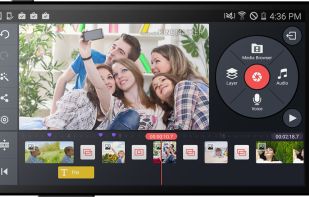
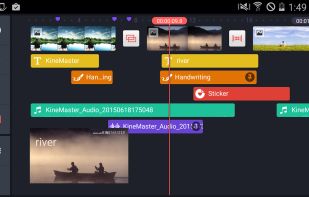
    Mobile video editor supporting multiple video, image, audio, sticker, and text layers, real-time previews, frame-by-frame edits, advanced color controls, transitions, precision audio, customizable effects, and direct sharing to online platforms.

    94 KineMaster alternatives

    Cost / License

    • Freemium
    • Proprietary

    Application type

    Platforms

    • Android
    • iPhone
    • Android Tablet
    • iPad
     
  2. Leverages multitrack timeline editing, built-in filters, effects, title templates, and stickers. Enhance video with audio tools, slow motion, and stabilize clips. Fast export to popular formats, upload directly to YouTube, Vimeo, and Google Drive.

    124 Movavi Video Editor alternatives

    Cost / License

    • Paid
    • Proprietary

    Application type

    Platforms

    • Mac
    • Windows
    • Online
     
  3. iMovie icon
     122 likes

    With iMovie for iOS and macOS, you can enjoy your videos like never before. It’s easy to browse your clips and create Hollywood-style trailers and stunning 4K-resolution movies. You can even start editing on iPhone or iPad, then finish on your Mac.

    177 iMovie alternatives

    Cost / License

    • Free
    • Proprietary

    Application type

    Platforms

    • Mac
    • iPhone
    • iPad
     
    |
    1
    iMovie vs OpenShot Comments
    Guest
    Positive
    -3

    Extremely fast, intuitive and easy to use interface, simple but powerful. Probably the best easy-to-use and free video editing software.

    • iMovie is Free and ProprietaryOpenShot is Free and Open Source
  4. Edits icon
     13 likes

    Edit videos with the Edits app, offering high-quality capture up to 10 minutes. Utilize AI animations, customizable captions, and share watermark-free videos. Access creative tools like filters and stickers, green screen overlay, camera settings, and detailed engagement insights.

    94 Edits alternatives

    Cost / License

    • Free
    • Proprietary

    Application type

    Platforms

    • Android
    • iPhone
     
  5. Edit images and videos on Android with a free, open-source tool featuring filters, cropping, rotation, brightness, contrast, saturation, video speed adjustment, mute, stabilization, trimming, plus dark and light themes, and no proprietary dependencies.

    Cost / License

    Application type

    Platforms

    • Android
    • F-Droid
     
  6. LibreCuts icon
     4 likes

    LibreCuts is a free, open-source video editor for Android that prioritizes simplicity and efficiency.

    50 LibreCuts alternatives

    Cost / License

    • Free
    • Open Source (MIT)

    Platforms

    • Android
     
  7. LumaFusion icon
     16 likes

    LumaFusion offers powerful features and an elegant UI. The simple-start timeline gives new users an intuitive head start, and professionals will find all the powerful features they need.

    Cost / License

    • Paid
    • Proprietary

    Application type

    Platforms

    • Mac
    • Android
    • iPhone
    • Chrome OS
    • Android Tablet
    • iPad
     
  8. VidCutter icon
     30 likes

    A modern, simple to use, constantly evolving and hella fast MEDIA CUTTER + JOINER w/ frame-accurate SmartCut technology + Qt5, libmpv, FFmpeg and MediaInfo powering the backend.

    Cost / License

    Application type

    Platforms

    • Mac
    • Windows
    • Linux
     
  9. VideoPad icon
     71 likes

    Comprehensive video editor with over 50 visual effects and transitions, offering real-time previews and fully adjustable parameters. Supports diverse audio/video formats, adds photos and text, and enables sharing on DVDs, HD DVDs, Blu-Ray, mobile devices, or online. Free and professional versions available.

    169 VideoPad alternatives

    Cost / License

    • Freemium
    • Proprietary

    Application type

    Platforms

    • Mac
    • Windows
    • Android
    • iPhone
    • Android Tablet
    • iPad
    • Kindle Fire
     
  10. Clipchamp icon
     14 likes

    Browser-based video editor offering customizable templates, stock footage and audio, intuitive drag-and-drop interface, real-time preview, webcam and screen recording, multiple file format support, fast auto-save, watermark-free exports, and cloud integration.

    145 Clipchamp alternatives

    Cost / License

    • Freemium
    • Proprietary

    Application type

    Platforms

    • Windows
    • Online
    • iPhone
    • Google Chrome
     
  11. This entry-level video editor offers a user-friendly drag-and-drop interface supporting various file types, advanced customization options with presets, keyframe animations for effect modulation, and features such as multicam support, storytelling tools, and more.

    113 MAGIX Video Deluxe alternatives

    Cost / License

    • Paid
    • Proprietary

    Application type

    Platforms

    • Windows
     
  12. Palmier Pro icon
     3 likes

    Palmier Pro is the video editor built for AI. Let AI tools like Claude and Codex directly read and edit your multi-track timeline. Generate images and videos inline using the latest models.

    54 Palmier Pro alternatives

    Cost / License

    Application type

    Platforms

    • Mac
     
You are at page 3 of OpenShot alternatives