
Oil Studio icon
Oil Studio icon

Oil Studio

 Like

Native Apple silicon Mac software for recording a display, window, or region with camera, microphone, and system audio. Edit with click-following zoom, cursor smoothing, transcript cuts, pause cleanup, local Whisper captions, and MP4, GIF, or SRT export.
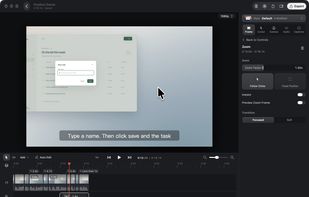
Zoom controls and an edited recording timeline in the native macOS editor.

Cost / License

  • Pay once
  • Proprietary

Application type

Since

  • New

Platforms

  • Mac  Requires macOS 15+ and Apple silicon.
0likes
0articles
Save

Features

Properties

Features

Highlights All activities

Oil Studio News & Activities

Recent activities

Oil Studio information

  • Developed by

    CN flagoil-oil
  • Licensing

    Proprietary and Commercial product.
  • Pricing

    One time purchase (perpetual license) ranging between $39 and $49.
  • Alternatives

    14 alternatives listed
  • Badge

    Get an embeddable badge for Oil Studio
  • Supported Languages

    • English
    • Chinese

AlternativeTo Category

Video & Movies
Oil Studio was added to AlternativeTo by oil-oil on and this page was last updated .

No comments or reviews, maybe you want to be first?

Official Links

What is Oil Studio?

Oil Studio is a native screen recorder and editor for Macs with Apple silicon running macOS 15 or later. It records an entire display, a window, or a selected region, with optional camera, microphone, and system-audio capture.

Its editor includes click-following zoom, cursor smoothing, timeline- and transcript-based cuts, pause and filler cleanup, and captions generated on-device with Whisper after an initial model download. Projects can be exported as H.264 or HEVC MP4 video up to 4K at 60 fps, GIFs, or SRT subtitle files. Recording and editing are free to try, while video and GIF exports require a paid license.

An optional command-line interface lets external AI agents access project context and transcripts, propose edits, and export projects. Cuts and zooms are added to a review bar by default; caption wording changes and chapters apply directly but can be undone. Recording, editing, and Whisper transcription run locally. Optional cloud transcription and narration send relevant audio or text to the selected provider, while external agents handle data according to their service and configuration.