

OfficeClone icon
OfficeClone icon

OfficeClone

Private browser office suite combining document, spreadsheet, presentation, project, PDF, and note tools. It offers AI assistance, local browser processing, common file exports, PWA installation, bilingual support, and free cross-device access.
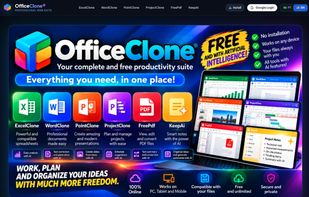
OfficeClone suite overview featuring ExcelClone, WordClone, PointClone, ProjectClone, FreePDF, and KeepAi with AI assistance.

Cost / License

  • Free
  • Open Source (MIT)

Application type

Platforms

  • Online
1like
0articles
Save

Features

Properties

  1.  Support for Themes
  2.  Lightweight
  3.  Privacy focused
  4.  AI-Powered

Features

  1.  Ad-free
  2.  Dark Mode
  3.  WYSIWYG Support
  4.  Works Offline
  5.  Import CSV Data
  6.  Spell Checking
  7.  No registration required
  8.  PDF annotation
  9.  No Tracking
  10.  Progressive Web App

OfficeClone News & Activities

Highlights All activities

Recent activities

OfficeClone information

AlternativeTo Category

Office & Productivity

GitHub repository

  •  0 Stars
  •  0 Forks
  •  0 Open Issues
  •   Updated  
View on GitHub
OfficeClone was added to AlternativeTo by Fabiano Braga on and this page was last updated .

No comments or reviews, maybe you want to be first?

Official Links

What is OfficeClone?

OfficeClone is a versatile, privacy-first web-based productivity suite designed as a lightweight and accessible alternative to traditional office suites. It runs directly in the browser as a Progressive Web App (PWA) with zero mandatory installation or setup.

The suite brings together 6 essential productivity tools in a unified interface:

• WordClone: A rich document and text editor with formatting tools, distraction-free writing, and intelligent text assistance. • ExcelClone: A spreadsheet application supporting standard formulas, tabular calculations, and data visualization. • PointClone: A dynamic presentation and slide deck maker with responsive layouts and export options. • ProjectClone: Interactive project and task planning featuring Gantt charts, timelines, and Kanban boards. • FreePDF: A comprehensive PDF toolkit for merging, splitting, compressing, annotating, and converting PDF documents locally. • KeepAi: Smart notes, reminders, checklists, and AI-powered knowledge management.

Key Features & Privacy:

  • Client-Side Engine: Core document processing and PDF conversions happen locally in your browser for high speed and data privacy.
  • AI Copilot: Built-in AI assistance for generating documents, analyzing spreadsheets, drafting slide outlines, and summarizing PDFs.
  • PWA & Offline Support: Installable on Windows, macOS, Linux, Android, and iOS with standalone app behavior.
  • Bilingual Support: Seamless real-time switching between English and Portuguese.
  • No Subscription Lock-in: Core tools are free to use without requiring an account for basic editing.