
Office Werkstatt icon

Office Werkstatt

 Like

Open-source office suite that works fully offline, with word processor, spreadsheet, presentations, notes, whiteboard, PDF, design, forms and a built-in AI agent in one window.
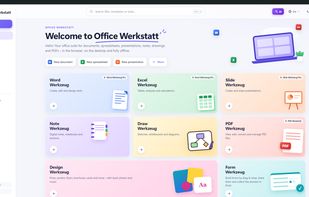
Dashboard with all nine Werkzeuge

Cost / License

  • Free
  • Open Source (MIT)

Since

  • New

GitHub

  • GitHub stars: 1

Platforms

  • Windows
  • Self-Hosted  Docker image, runs in the browser
  • Android  Android 7+ (64-bit), APK from GitHub Releases
0likes
0articles
Save

Features

Properties

Features

Highlights All activities

Office Werkstatt News & Activities

Recent activities

Office Werkstatt information

AlternativeTo Category

Office & Productivity

GitHub repository

  •  1 Star
  •  0 Forks
  •  0 Open Issues
  •   Updated  
View on GitHub
Office Werkstatt was added to AlternativeTo by Suleyman-Akbulut on and this page was last updated .

No comments or reviews, maybe you want to be first?

What is Office Werkstatt?

Office Werkstatt is an integrated, open-source (MIT) office suite that works fully offline – in the browser, on the Windows desktop, on Android and on your own server. Nine tools ("Werkzeuge") share one window:

  • Word Werkzeug: documents with a full engine, stored as .docx
  • Excel Werkzeug: spreadsheets with multiple sheets and formulas (.xlsx)
  • Slide Werkzeug: presentations (.pptx) with built-in OpenDocument support
  • Note Werkzeug: notebooks, sections and pages, tags, pen input and a calendar with .ics import/export
  • Draw Werkzeug: infinite whiteboard with sticky notes, shapes, connectors and mind maps
  • PDF Werkzeug: view, edit, annotate, sign and convert PDFs
  • Design Werkzeug: posters, social posts and flyers with templates and a brand kit
  • Form Werkzeug: build forms by drag and drop and collect the answers
  • AI Werkzeug: a built-in AI agent in every tool, using a local llama.cpp engine, Ollama or any OpenAI-compatible API

There is no CDN and no cloud: documents stay on your computer or phone. The server edition runs as a Docker image with a first-run setup in the browser, users and roles, an admin panel and logs. The interface is available in English, German, Turkish, Spanish and French.