Microsoft Lens Alternatives

Microsoft Lens is described as 'Trims, enhances, and straightens scanned documents or whiteboards, exports to PDF, Word, or PowerPoint, supports text extraction, and saves to cloud storage' and is a document scanner in the photos & graphics category. There are more than 50 alternatives to Microsoft Lens for a variety of platforms, including Android, iPhone, Windows, iPad and Android Tablet apps. The best Microsoft Lens alternative is Pocket Scanner. It's not free, so if you're looking for a free alternative, you could try OSS Document Scanner or FairScan. Other great apps like Microsoft Lens are Google Lens, CamScanner, Snagit and GImageReader.

filter to find the best alternatives

Microsoft Lens alternatives are mainly Document Scanners, but if you're looking for Screenshot Capture Tools or Image Scanners you can filter on that. Other popular filters include Open Source, Windows, Mac, Linux, Scan documents and Android. You can also filter by region, for example EU-based alternatives if you prefer software developed in the European Union. These are just examples - use the filter bar below to find more specific alternatives to Microsoft Lens.
Copy a direct link to this comment to your clipboard
Microsoft Lens alternatives page was last updated

Alternatives list

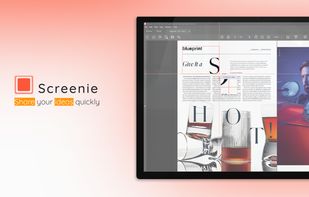
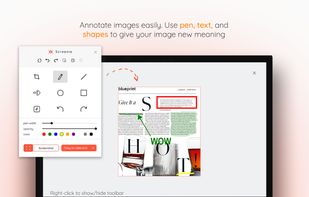
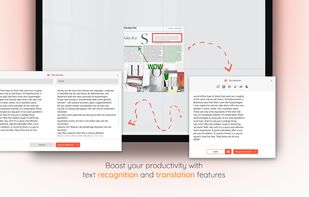
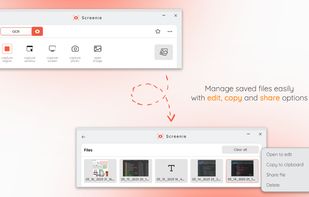
  1. 💥 Capture and share your ideas quickly and easily with Screenie - the ultimate screenshot tool for designers, developers, and anyone who needs to share information efficiently. Simply take a snap, annotate it, and copy it to the clipboard in seconds.

    48 Screenie for Windows alternatives

    Cost / License

    • Freemium
    • Proprietary

    Application type

    Platforms

    • Windows
     
  2. ScreenOCR - born for scanning your documents and extract text from images and photos with your Android devices. Highest Speed & Highest Quality! Support translation.

    Cost / License

    • Free
    • Proprietary

    Platforms

    • Android
     
  3. DocScan icon
     2 likes

    When you need a digital copy of some paper document to send out, but there is no flatbed scanner nearby, it can help you!

    Cost / License

    • Free
    • Proprietary

    Platforms

    • iPhone
    • iPad
     
  4. Digital scanning of any image document, Multi-Page scans, PDF creation, Batch OCR in any language, Batch translations.

    Cost / License

    • Free
    • Proprietary

    Application type

    Platforms

    • Android
     
  5. U Scanner icon
     1 like

    U Scanner is a simple all-in-one scanning app that allows you to capture and enhance content on the go, Digitize, save and share meeting slides, whiteboard annotations, receipts, and even napkin scribbles, with a single click.

    38 U Scanner alternatives

    Cost / License

    • Freemium
    • Proprietary

    Platforms

    • Android
    • iPhone
     
  6. Boxoft Screen OCR is fast and easy-to-use software which helps to extract any area on your screen, recognize every character and then save as TXT file. Price: 27 USD. The smart tool enables you to select text from anywhere on the screen, including areas that you cannot highlight...

    Cost / License

    • Paid
    • Proprietary

    Application type

    Platforms

    • Windows
     
  7. Universal Copy is the fastest way to copy text on Android, even from the apps that won’t let you or inside images.

    78 Universal Copy alternatives

    Cost / License

    • Freemium
    • Proprietary

    Platforms

    • Android
    • Android Tablet
     
  8. This app allows you to scan documents, receipts, tickets, reports or anything with your device.

    Cost / License

    • Freemium
    • Proprietary

    Platforms

    • Android
    • iPhone
    • Android Tablet
    • iPad
     
  9. You can use Easy Screen OCR to capture a snapshot and start OCR process. this program will detect the text from the image and start OCR process immediately. You can extract the text to copy and paste in seconds.

    Cost / License

    • Paid
    • Proprietary

    Platforms

    • Mac
    • Windows
    • Android
    • iPhone
     
  10. Screen OCR icon
     3 likes

    Screen OCR is a screen capture and character recognition tool. You can use Screen OCR in any way you are most comfortable with. It can be window selection, scrolling capture, simple cursor capture or rectangular selection.

    Cost / License

    • Paid
    • Proprietary

    Application type

    Platforms

    • Windows
     
  11. pixFront icon
     1 like

    Corrects a particular object in an image to "look like it is seen from the front".

    Cost / License

    • Free
    • Open Source

    Platforms

    • Windows
     
  12. Quick Scan icon
     4 likes

    A scanner utility that enables you to quickly scan documents and manually set the DPI level, preferred file format and JPEG file compression.

    Cost / License

    • Free
    • Proprietary

    Application type

    Platforms

    • Windows
     
You are at page 6 of Microsoft Lens alternatives