NovaPadGo icon
NovaPadGo icon

NovaPadGo

 Like

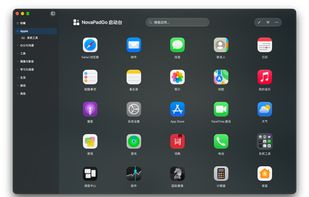
Offers sidebar app management for Mac, featuring one-click access to applications, directory tree navigation, quick search for files, flexible organization with folders and categories, app aliases, instant launch, and privacy protection to hide sensitive apps.
NovaPadGo screenshot 1

Cost / License

  • Freemium (Pay once or Subscription)
  • Proprietary

Application type

Since

  • Since 2025

Platforms

  • Mac
0likes
0articles
Save

Features

Properties

Features

Highlights All activities

NovaPadGo News & Activities

Recent activities

NovaPadGo information

  • Developed by

    CN flagboluobn
  • Licensing

    Proprietary and Freemium product.
  • Pricing

    One time purchase that costs $18, and / or subscription that costs $1 per month + free version with limited functionality.
  • Alternatives

    15 alternatives listed
  • Badge

    Get an embeddable badge for NovaPadGo
  • Supported Languages

    • English
    • Chinese
    • French
    • German
    • Italian
    • Japanese
    • Korean
    • Russian
    • Spanish

AlternativeTo Category

OS & Utilities
NovaPadGo was added to AlternativeTo by boluobn on and this page was last updated .

No comments or reviews, maybe you want to be first?

What is NovaPadGo?

NovaPadGo is an application launcher and organizer for macOS. It provides sidebar navigation, folders and categories, app search, aliases, and options to hide applications.

Users can collect frequently used apps in a Favorites tab, display application sizes, sort apps by size, and adjust font sizes. It also supports customizable folder icons and button and popup styling designed to match macOS Liquid Glass.

NovaPadGo requires macOS 14.6 or later. It supports English, French, German, Italian, Japanese, Korean, Russian, Spanish, Simplified Chinese, and Traditional Chinese. The app is free to download from the Mac App Store, with monthly, annual, and lifetime in-app purchase options.

NovaPadGo offers three layout options: a sidebar with categories on the left, top tabs with categories across the top, and bottom dots for page navigation. Users can choose the layout that fits their preferred way of browsing and launching apps.

Favorites provides additional shortcuts without moving apps from their original locations. Apps can be added with “Add to Favorites” in the right-click menu or by dragging them to the Favorites tab. Shortcuts can be removed from the Favorites tab, which can also be shown or hidden. The menu bar icon can be set to “Show Favorites” instead of “Show Apps” to open the collection without opening the full launcher. The Favorites window defaults to a 3 × 3 grid; Pro supports adjustable rows and columns. The settings screenshot shows a customized 4 × 6 preview. Menus and settings may vary by version.