NoteLoom icon
NoteLoom icon

NoteLoom

A local-first Markdown workspace that opens real folders in your browser and saves changes directly to .md files on disk.

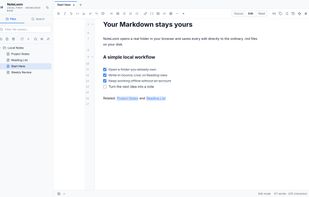
The NoteLoom workspace: a local folder mounted in the browser, with its file tree, live editing, and the source / edit / read view controls.

Cost / License

  • Free
  • Proprietary

Application type

Platforms

  • Online
  • Google Chrome
  • Microsoft Edge

Features

Properties

  1.  Lightweight
  2.  Distraction-free
  3.  Privacy focused
  4.  Local-First

Features

  1.  Full-Text Search
  2.  Support for MarkDown
  3.  Syntax Highlighting
  4.  Dark Mode
  5.  WYSIWYG Support
  6.  File Tagging
  7.  Ad-free
  8.  Hierarchical Structure
  9.  Works Offline
  10.  No registration required
  11.  Web Clipper
  12.  Markdown preview
  13.  Browser extension
  14.  Write files in markdown

NoteLoom News & Activities

Highlights All activities

Recent activities

NoteLoom information

AlternativeTo Categories

Office & ProductivityWeb BrowsersFile Management

Popular alternatives

View all
NoteLoom was added to AlternativeTo by beep_beep on and this page was last updated .
No comments or reviews, maybe you want to be first?

Official Links

What is NoteLoom?

NoteLoom is a local-first Markdown workspace for people who keep their notes as ordinary files. It runs in Chromium desktop browsers, opens a folder on your computer with the File System Access API, and reads and writes the actual .md files inside it. Notes stay on your disk, and no account is required.

You can switch between source, live writing, and reading views. A folder tree, tabs, quick open, outline, tags, and relative image support make larger collections easier to browse and edit. NoteLoom supports CommonMark and GitHub Flavored Markdown, including tables, task lists, and strikethrough. It also works offline once the app has loaded.

A companion Chrome extension adds reader mode and web clipping. It can turn a page into Markdown and save the result to a local folder through NoteLoom. The extension also creates searchable transcripts from available YouTube and Bilibili subtitles.

NoteLoom is designed for people who want browser convenience while keeping control of plain Markdown files.