Notch Studio icon
Notch Studio icon

Notch Studio

Native screen recorder for Mac and Windows with auto-zoom, segment recording, multilingual captions, and a one-time license.
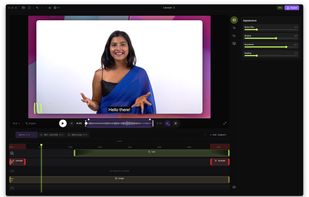
Notch editor — record, zoom, annotate, and export in one app

Cost / License

  • Freemium (Pay once)
  • Proprietary

Platforms

  • Mac
  • Windows
0likes
0comments
0articles

Features

Properties

  1.  Privacy focused

Features

  1.  Ad-free
  2.  Works Offline
  3.  Support for Layers
  4.  Screen Sharing
  5.  Support for 4K
  6.  Dark Mode
  7.  Live Preview
  8.  Non Destructive Editing
  9.  No Tracking
  10.  No registration required
  11.  Transitions Effects
  12.  Hardware Accelerated
  13.  Screen Recording
  14.  Video screen capture
  15.  Video annotation
  16.  Webcam overlays
  17.  Convert Videos to Animated GIFs
  18.  Background Music
  19.  Cross-Platform

Notch Studio News & Activities

Highlights All activities

Recent activities

Notch Studio information

  • Developed by

    RS flagAlexander Lukashov
  • Licensing

    Proprietary and Freemium product.
  • Pricing

    One time purchase (perpetual license) ranging between $29 and $49 + free version with limited functionality.
  • Alternatives

    8 alternatives listed
  • Supported Languages

    • English
Notch Studio was added to AlternativeTo by loookashow on and this page was last updated .
No comments or reviews, maybe you want to be first?

What is Notch Studio?

Notch is a native screen recorder and editor for macOS and Windows, built for people who produce repeatable video content — tutorials, course lessons, DevRel walkthroughs, product demos, and localized versions of all of the above.

The recorder captures screen, window, microphone, system audio, and webcam. The editor runs in the same app: auto zoom that follows the cursor with six depth levels, cursor highlights with click and keystroke overlays, annotations with timeline-based animations, 50+ background templates, webcam overlay with nine positions, trim and speed control from 0.25x to 3x, background music with per-track mixing, and export to MP4 (H.264, H.265, VP9, AV1) up to 4K, or GIF.

The feature that distinguishes Notch from other screen recorders is segment recording. Instead of forcing a single-take workflow, the recorder lets you stop, re-record any chunk, reorder segments, and combine them with transitions — all without leaving the app or opening a separate video editor.

Multilingual captions are a first-class workflow. Add captions in any language, ship either burned-in subtitles or a standalone SRT file, and reuse the same recording for multiple locales. AI-driven caption translation, AI voiceover generation, and audio enhancement — through bring-your-own-key API access to Claude, ChatGPT, and Gemini — are on the roadmap, alongside a CLI and MCP-based agent integration that will let LLM agents drive Notch headlessly for batch operations and pipeline automation.

Notch is fully offline — no sign-up, no account, no cloud, no telemetry. Recordings stay on the user's machine until they decide to share them. The free tier exports without a paywall (with a watermark and a 5-project limit). The Pro license is a one-time purchase that includes future updates.
