Nodebook: PDF Notes & Mind Map icon

Nodebook: PDF Notes & Mind Map

Read PDFs, EPUBs, text files, web pages, video and audio, then turn highlights, scans, handwritten notes or page clips into source-linked nodes on an infinite canvas. Search and organize the map as an outline, create flashcards, and collaborate with version history.
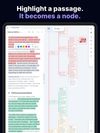
Highlight a passage in a document and turn it into a linked mind-map node.
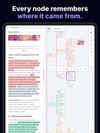
Each map node links back to its exact source passage.
+2
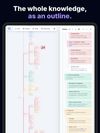
Switch between an infinite mind map and an editable outline.

Cost / License

  • Freemium (Pay once or Subscription)
  • Proprietary

Platforms

  • Online
  • Android
  • iPhone
  • Windows
0likes
0articles
Save

Features

Properties

Features

Highlights All activities

Nodebook: PDF Notes & Mind Map News & Activities

Recent activities

Nodebook: PDF Notes & Mind Map information

  • Developed by

    Kamil Zabiegała
  • Licensing

    Proprietary and Freemium product.
  • Pricing

    One time purchase that costs $40, and / or subscription that costs $9 per month + free version with limited functionality.
  • Alternatives

    12 alternatives listed
  • Badge

    Get an embeddable badge for Nodebook: PDF Notes & Mind Map
  • Supported Languages

    • English
    • Polish
    • Spanish
    • French
    • German
    • Italian
    • Russian
    • Dutch
    • Greek
    • Ukrainian

AlternativeTo Categories

Office & Productivity, Education & Reference, News & Books, Remote Work & Education

Apple AppStore

  •   Updated 
  •   0 avg rating
View in AppStore

Popular alternatives

View all
Nodebook: PDF Notes & Mind Map was added to AlternativeTo by thejungle on and this page was last updated .

No comments or reviews, maybe you want to be first?

Official Links

What is Nodebook: PDF Notes & Mind Map?

Nodebook is a document reader that integrates with an infinite mind map. You can highlight a passage from any type of file or web page, and it will appear on your canvas as a node. The map builds itself as you read and select passages.

The free version allows you to open various file types, read at your own pace, and leave off exactly where you stopped. It also includes annotation tools like OCR in 12 languages, LaTeX rendering for equations, and the ability to write, underline, and draw on the page. You can also crop parts of a page and send it to the map, insert a notepad for comments, and use six different highlight colors.

Nodebook Plus offers an infinite canvas with no limit on nodes or depth. You can reorganize, merge, and separate nodes, set snippets aside, and keep a mini-map in view. You can export the map as a PDF or a FreeMind file, and back everything up into one .nodebook file.

Nodebook Plus also allows you to view and edit the map as an outline, search the full text of every snippet, create wiki-links between notes, and turn snippets into flashcards. You can also write your own documents with a rich-text editor and draw vector diagrams.

Nodebook Max lets you share and collaborate on projects, send files to other accounts, and keep a version history.

Nodebook is free to install. Nodebook Plus costs $39.99 for full offline functionality. Nodebook Max costs $8.99 a month or $89.99 a year for cloud syncing, collaboration, and version history.