
NicoVault Disk Cloner icon

NicoVault Disk Cloner

 Like

Clone Windows to a new SSD without reinstalling: copies only the data in use, verifies every block and starts like the old disk.
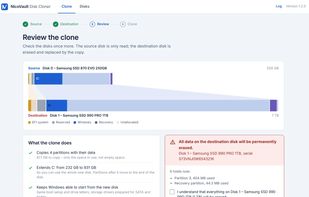
Review before cloning: C: grows from 232 GB to 931 GB on the new SSD

Cost / License

  • Freemium (Pay once or Subscription)
  • Proprietary

Application type

Since

  • New

Platforms

  • Windows  Windows 10 and 11, 64-bit
0likes
0articles
Save

Features

Features

Highlights All activities

NicoVault Disk Cloner News & Activities

Recent activities

NicoVault Disk Cloner information

  • Developed by

    RO flagNicoVault
  • Licensing

    Proprietary and Freemium product.
  • Pricing

    One time purchase that costs $29, and / or subscription that costs $58 per year + free version with limited functionality.
  • Alternatives

    10 alternatives listed
  • Badge

    Get an embeddable badge for NicoVault Disk Cloner
  • Supported Languages

    • English

AlternativeTo Category

Backup & Sync
NicoVault Disk Cloner was added to AlternativeTo by nicovault on and this page was last updated .

No comments or reviews, maybe you want to be first?

What is NicoVault Disk Cloner?

NicoVault Disk Cloner copies a Windows disk to a new SSD or hard disk, so the computer starts from the new disk exactly as before: same Windows, programs, files and drive letters, with no reinstall.

How it works: choose the disk to copy and the new disk, then check the review. It shows both disks side by side and what will happen before anything is written. The source disk is only read.

Two modes:

  • The whole disk: every partition is copied, including D: and other data partitions.
  • Windows only (C:): copies C: and the partitions Windows needs to start, so you can move Windows to a smaller SSD and leave a large data partition behind.

What it does:

  • Copies only the space in use, not empty space, so a 1 TB disk with 90 GB of data is cloned in minutes.
  • Verifies every copied block after the clone.
  • On a larger disk, C: grows to use the new space and the partitions after it move to the end of the disk.
  • Fits a smaller disk when the data fits, and tells you which partition to shrink when it doesn't.
  • Keeps Windows bootable: boot configuration, drive letters and the recovery environment are carried over, and storage drivers are prepared for SATA and NVMe.
  • Supports SATA and NVMe SSDs, hard disks and USB enclosures; GPT (UEFI) and MBR (BIOS) disks, including MBR extended and logical partitions.

Requirements: Windows 10 or 11, 64-bit.

The free version does everything up to the start of the clone and makes real clones of up to 5 GB of data. Personal license: one-time payment for up to 3 computers. Technician license: yearly, unlimited computers.