Tab Widgets icon
Tab Widgets icon

Tab Widgets

 Like

Free new tab extension for Chrome and Edge that turns the new tab page into a customizable dashboard of 70+ widgets: notes, weather, Google Calendar, Gmail and more.
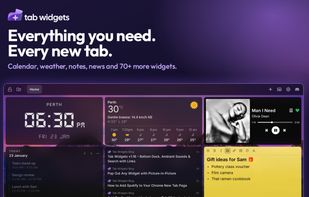
The Tab Widgets new tab page in dark mode over a mountain wallpaper. It shows a Perth digital clock, an hourly weather forecast, a Spotify player, today’s Google Calendar events, an RSS feed of blog posts, and a yellow sticky note of gift ideas.

Cost / License

  • Freemium (Pay once or Subscription)
  • Proprietary

Application type

Since

  • Since 2026

Platforms

  • Online
  • Google Chrome
  • Microsoft Edge
0likes
0articles
Save

Features

Properties

Integrations

Features

Highlights All activities

Tab Widgets News & Activities

Recent activities

Tab Widgets information

  • Developed by

    AU flagNOIR APPS PTY LTD
  • Licensing

    Proprietary and Freemium product.
  • Pricing

    One time purchase that costs $180, and / or subscription ranging between $4 and $5 per month + free version with limited functionality.
  • Alternatives

    19 alternatives listed
  • Badge

    Get an embeddable badge for Tab Widgets
  • Supported Languages

    • English
Tab Widgets was added to AlternativeTo by noirappsptyltd on and this page was last updated .

No comments or reviews, maybe you want to be first?

Official Links

What is Tab Widgets?

Tab Widgets is a new tab extension for Chrome and Microsoft Edge that replaces the default new tab page with a customizable dashboard. Widgets can be dragged, resized and arranged freely, from a minimal clock and search bar to a full productivity layout. It is also available as a web app.

More than 70 widgets are available, including sticky notes, to-do lists, reminders, weather forecasts, analog, digital and flip clocks, a Pomodoro timer, countdowns, calculators, currency and unit converters, quotes, word of the day, ambient sounds, bookmarks and link groups, news feeds, TradingView market data, and embeds for sites like YouTube, ChatGPT, Claude and Gemini. It can also control Philips Hue lights from the new tab.

Users can set up multiple pages (for example work, focus and reading), pin frequently used widgets to a dock, pop any widget out with picture-in-picture, choose from wallpapers, and add pixel pets that live on the page.

Tab Widgets is free to use and doesn’t require an account. When a Google account is connected, emails, calendar events, Drive files and tasks are fetched directly from Google by the browser and stay on the device. They are never sent to Tab Widgets’ servers.

An optional Pro plan (monthly, yearly or lifetime) unlocks the Gmail, Google Calendar, Google Tasks, Google Drive, RSS and Spotify widgets, plus cloud sync and unlimited pages.

Tab Widgets Videos