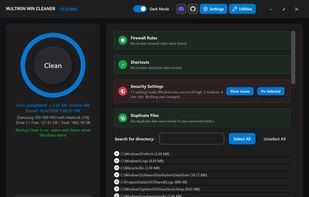
Multron Win Cleaner is a comprehensive system maintenance, security, and disk recovery suite engineered for Windows. Unlike conventional cleaning tools, it pairs deep low-level system controls (DISM, SFC, WinSxS) with transparent, community-updatable cleaning definitions. A unified scan checks junk files, system health, firewall rules, shortcuts, security settings, and duplicate files all at once.
Key Features
🧹 Deep System Cleanup
Modular Rules: Community-updated definitions for 3rd-party software and browser caches. Rules are kept in an external database, allowing instant community contributions without app updates.
Advanced Filtering: Deep log tracing (.log, .dmp, .tmp, .bak). Target files strictly by age, set folder exceptions, and run native Windows Disk Cleanup silently in the background.
🩺 System Health (DISM & SFC)
Run DISM and SFC directly inside the app with live progress—no command windows required.
Color-coded result panels explain component store health. Repair WinSxS, the Windows image (/RestoreHealth), or system files (sfc /scannow) on demand.
🛡️ Security Check
Scans 50+ settings that weaken your PC (disabled UAC/Firewall/Defender, SMB 1.0, active Guest accounts, AutoRun, Office macros, etc.).
Every finding shows a HIGH, MEDIUM, or LOW risk level. One-click "Fix Selected" backs up previous values so any fix can be easily undone.
🔎 Unified Scanning
Firewall Rules, Shortcuts, Security Settings, and Duplicates run as steps during the main scan.
Review all findings in dedicated panels before any automatic changes are made.
⏰ Automatic Cleaning
Flexible schedules (interval, daily, weekly) with smart run conditions that pause if the CPU is busy or the PC is in use. Startup cleaning and non-intrusive background notifications included.
🔒 Locked File Management
Real-time file lock detection surfaces the active Process Name, PID, and path. Force unlock and delete safely terminates non-system processes holding the file.
⚙️ System & Startup Control
Startup Manager & Sentinel: Toggles boot entries across the Registry and Task Scheduler, with real-time alerts when new apps register at boot.
System Optimization: Fix dead shortcuts, clear broken firewall rules, and apply performance profiles for old/new systems (with activity logs and undo options).
📊 Storage & Performance Utilities
Duplicate File Finder: Byte-by-byte verified duplicate scanning with side-by-side views and safe-delete.
Large File Finder: Isolates oversized media and archives with a comprehensive pre-deletion audit table.
Resource Monitor: Live visual tracking for CPU/RAM and a built-in memory optimizer.
Requirements & Info
OS: Windows 10/11 (64-bit recommended)
Runtimes: .NET 8 Desktop Runtime
Privileges: Administrator permissions required
Open Database: https://github.com/winball501/MultronWcleaner-Database Contribute to cleaning rules directly via the GitHub repo. MIT Licensed







 Yonas Abeselom added Multron Win Cleaner as alternative to REDACT
 Paul added Multron Win Cleaner as alternative to Cache Out
 Danilo Venom added Multron Win Cleaner as alternative to optimizerDuck
 MahirGunduz added Multron Win Cleaner as alternative to Disk Mop
 dbfx added Multron Win Cleaner as alternative to Kudu Cleaner





No comments or reviews, maybe you want to be first?