Multi Dock Alternatives

Multi Dock is described as 'MultiDock is a simple application that allows you to organize frequently used applications, documents and folders using small panels (Dock’s)' and is a application launcher in the os & utilities category. There are more than 50 alternatives to Multi Dock for Mac, Windows, Linux, File Explorer and X11. The best Multi Dock alternative is RocketDock, which is free. Other great apps like Multi Dock are Compiz, Pieoneer, DockProfiles and ObjectDock.

Copy a direct link to this comment to your clipboard
Multi Dock alternatives page was last updated

Alternatives list

  1. MaxTo icon
     18 likes

    MaxTo is a small Windows program that divides your monitors into regions. When you maximize a window, it will no longer fit the entire screen, but only the region it was maximized into. Your windows are neatly organized into the grid you have defined when they are maximized.

    Cost / License

    • Paid
    • Proprietary

    Platforms

    • Windows
     
  2. InfyniDock icon
     1 like

    InfyniDock is an alternative dock for macOS that provides an expanded window of open windows without collapsing them. It offers keyboard shortcuts to switch between windows and allows for customizable themes.

    31 InfyniDock alternatives

    Cost / License

    • Paid
    • Proprietary

    Platforms

    • Mac
     
  3. BetterSnapTool icon
     25 likes

    BetterSnapTool is a utility that mimics Windows 7 Aero snap, allowing you to easily manage your window positions and sizes by either dragging them to one of your screens corners or to the top, left or right side of your screen.

    Cost / License

    • Paid
    • Proprietary

    Application type

    Platforms

    • Mac
     
  4. WinDock icon
     17 likes

    WinDock is a window manager ideal for large, or multi-monitor setups.

    Features: -Easy and intuitive drag-and-drop action to simplify moving and resizing Windows. -Highly customizable docking rules that specify how you want your windows to behave. -Multiple rule profiles/layouts.

    17 WinDock alternatives

    Cost / License

    • Free
    • Proprietary

    Application type

    Platforms

    • Windows
     
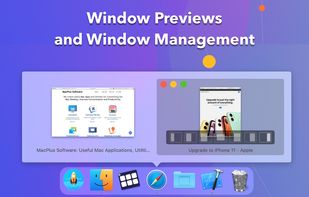
  5. DockView is a macOS utility that shows live previews (thumbnails) of an application’s open windows when you hover over its icon in the Dock. You can quickly switch, minimize, or close windows directly from that preview panel — all without altering the system Dock itself.

    Cost / License

    • Paid
    • Proprietary

    Application type

    Platforms

    • Mac
     
  6. VEEER icon
     5 likes

    VEEER is a lightweight window manager for your mac OSX - designed for designers & developers and built for a maximum workflow speed.

    Cost / License

    • Paid
    • Proprietary

    Application type

    Platforms

    • Mac
     
  7. Plumb icon
     5 likes

    Plumb is designed to reduce the time spent manually moving windows on your desktop. With higher resolution and larger monitors becoming the norm it’s common to have several applications open at any given time — none of which really need 100% of the screen.

    46 Plumb alternatives

    Cost / License

    • Free Personal
    • Proprietary

    Application type

    Platforms

    • Windows
     
  8. Deskovery icon
     2 likes

    Deskovery is an OS X window manager. Windowshade, align, resize, change transparency of your windows.

    Cost / License

    • Paid
    • Proprietary

    Application type

    Platforms

    • Mac
     
  9. Dragthing icon
     7 likes

    DragThing is the original dock designed to tidy up your Macintosh desktop.

    It puts all your documents, folders, and applications just a single click away. Highly flexible, it allows multiple docks, each customised to suit your exact needs.

    It stores frequently-used clippings su.

    70 Dragthing alternatives

    Cost / License

    • Freemium
    • Proprietary

    Application type

    Alerts

    • Discontinued

    Platforms

    • Mac
     
  10. Stay icon
     9 likes

    If you’re fastidious about keeping your windows tidy, Stay is for you. Stay ensures that your windows are always where you want them to be, even as you connect and disconnect displays.

    Cost / License

    • Paid
    • Proprietary

    Platforms

    • Mac
     
  11. WindowSpace icon
     12 likes

    WindowSpace is a powerful desktop enhancement utility for large monitors, widescreens and multi-monitor systems. Once installed, it allows you to manipulate windows in many new amazing ways – snap windows to the screen edges and other windows, move and resize them with keyboard...

    35 WindowSpace alternatives

    Cost / License

    • Paid
    • Proprietary

    Application type

    Platforms

    • Windows
     
You are at page 3 of Multi Dock alternatives