


MongoDB Compass
4 likes
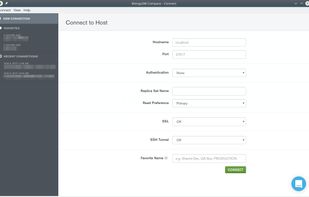
The GUI for MongoDB. Visually explore your data. Run ad hoc queries in seconds. Interact with your data with full CRUD. View and optimize your query performance. Compass empowers you to make smarter decisions about indexing, document validation, etc.

Cost / License
- Free
- Proprietary
 United States
Since
- Since 2018


Features
Highlights All activities
MongoDB Compass News & Activities
Recent activities
 finalbyte added MongoDB Compass as alternative to MongoDB Tiny Client
 Fahid_Mohammad added MongoDB Compass as alternative to MongoQUI
 micu added MongoDB Compass as alternative to BsonJet
 maathis added MongoDB Compass as alternative to Mongonaut
 webendcreator added MongoDB Compass as alternative to DataStudio
 antonio3333lima added MongoDB Compass as alternative to NoSqlStudio
 tnaum-ms added MongoDB Compass as alternative to DocumentDB for VS Code
 Monghoul added MongoDB Compass as alternative to Monghoul
 sozocode added MongoDB Compass as alternative to Visualeaf





xenmaster's data-science tools
Data Science is more about learning concepts rather than software. These concepts include statistics, linear algebra, and ab-testing. But the following tools are the most commonly used in this practice.



Softwares
a 'Must Have' List of softwares for any Windows user.


Xenmaster's 2026 Back-End Web Development Catalog
This list is an update to the list I created seven years ago https://alternativeto.net/lists/8010/back-end-web-development/ which focused on the server-side aspect of web applications. The web and development has changed a lot since then and rather than re-write history, decided to create a new list based on current patters and shifts in enterprise environments. These details are based on both what I've seen in the professional world as well as for hobbyists and web development enthusiasts who run their own projects. The general pattern for back-end development will cover three main points for each function:
Self Hosted Option
Third-Party Service Option
AWS Option
I also cover any GUI interfaces available for folks who don't want to interact with these services using a terminal.
In addition to consulting the documentation for each of the tools below, I'd like to shout out the following projects which also played a big part in informing the overall structure of this list:
Jeff Delaney's 100 Second Videos: https://www.youtube.com/@Fireship
Kamran Ahmed's Roadmaps: https://roadmap.sh
Stack Overflow's Developer Survey: https://survey.stackoverflow.co/2025/
The beginning of this list will cover some common languages used to build server-based APIs for web applications, including Python, Javascript, C#, and Go. Honorable mentions, some of which were from my original list, include the following:
Rails with Ruby: one of the best developer experiences but counterbalanced by terrible performance from a speed and efficiency perspective. This framework is still really popular in India.
Spring Boot with Java: A very common enterprise-based application framework and particularly popular in China. But it requires Java, which I wouldn't wish on anyone.
Laravel with PHP: PHP gets a lot of hate, but I used it back 20 years ago and am still fond if it. PHP is generally useful for Wordpress-based sites too. Has performance issues though since it is an interpreted language.
Phoenix with Elixir: Also a great developer experience and is very popular on the Stack Overflow survey. Only reason I can't recommend is because you will be learning Elixir just to use Phoenix because it isn't a language really used for anything else mainstream.
Note that I don't plan on covering anything AI related for the development process. Of Generative AI, wickedest of technological inventions, I shall neither speak nor give direction.
Update: 10-11-2026: The Deno team has announced they will no longer maintain their runtme after October 2027: https://deno.com/blog/cloudflare. I'll be removing all the references to this ecosystem since I don't want to encourage folks to buy into something that will be unsupported a year from now.
Comments and Reviews
So much for being the 'official' app to manage MongoDB--the font size they use for database documents is too small without any option to be adjusted. Seems like they don't know anything about UX or accessibility and should be left just doing database things.