Mintype is a notes app for documents and whiteboards. Everything is encrypted on your device before it is saved or synced, so only you can read your notes. It works offline, runs in any modern browser, and syncs free through your own Google Drive.
🔒 Private by design
All notes are encrypted on your device (AES-GCM) before they are written to browser storage.
Notes unlock only with your password, which is never stored anywhere.
Notes are encrypted before they reach Google Drive. Open your Drive folder and you will see ciphertext.
Mark a page as sensitive to require your password again before it opens. This helps if you leave your device unattended.
QuickShare links carry their decryption key in the part of the URL that never reaches a server. Mintype only stores the encrypted file.
✍️ Documents
Rich text with fonts, sizes, colours, highlights, links, and page mentions (@).
Blocks for callouts, collapsible coloured sections, 2–4 column layouts, tables, to-do lists, code with syntax highlighting, images, YouTube, and Google Maps.
Drag any block by its handle, or tap the handle on a phone to move, duplicate, or delete it.
Everything is stored as Markdown, so your notes stay portable.
🖼️ Whiteboards
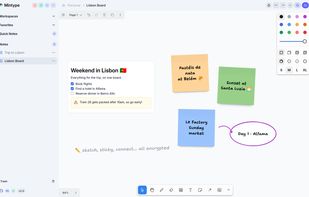
An infinite canvas with sticky notes, shapes, freehand drawing, arrows, groups, and images.
Markdown boxes put the full document editor onto the canvas: to-dos, callouts, tables, and more.
Follows the app's light or dark theme.
📱 Works everywhere, even offline
A web app that works in any modern browser. Chrome and Firefox are recommended on desktop.
Install it as an app (PWA): use Chrome on Android or Safari on iOS for the most native feel.
Fully usable offline. Changes are queued and sync when you are back online.
Phones get every feature, with menus that open as easy-to-tap bottom sheets.
🗂️ Simple organisation
A familiar workspace → page → sub-page structure.
Quick Notes for jotting things down on the go and organising later.
Favourites, a trash folder, drag-and-drop reordering, and moving pages between workspaces.
Search across documents and whiteboards.
Import from Notion, Markdown, or Mintype JSON. Export to Markdown or encrypted JSON backups.
Light and dark mode.







 Project 59



No comments or reviews, maybe you want to be first?