





MarkDawn Writer
Like
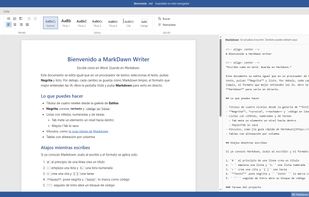
MarkDawn Writer is a document editor that works like Word but saves only Markdown, the format AI assistants understand best. You write with the familiar ribbon (styles, bold, lists, tables, tasks, links, images and code blocks) and you never see an asterisk or a hash sign.

 EU

Features
Highlights All activities
MarkDawn Writer News & Activities
Recent activities
- diegocanodev added MarkDawn Writer
 diegocanodev added MarkDawn Writer as alternative to Typora, Microsoft Word, Obsidian, MarkText and 5 more


Developed by
 Diego Cano
Licensing
Open Source (MIT) and Free product.Alternatives
9 alternatives listedBadge
Get an embeddable badge for MarkDawn WriterSupported Languages
AlternativeTo Category
Office & ProductivityGitHub repository
- 9 Stars
- 0 Forks
- 0 Open Issues
- Updated



No comments or reviews, maybe you want to be first?