Lutris Alternatives for Linux

There are many alternatives to Lutris for Linux if you are looking for a replacement. The best Linux alternative is Steam, which is free. If that doesn't suit you, our users have ranked more than 50 alternatives to Lutris and many of them are available for Linux so hopefully you can find a suitable replacement. Other interesting Linux alternatives to Lutris are Heroic Games Launcher, PlayOnLinux - PlayOnMac, Bottles and Retrom.

filter to find the best alternatives

Lutris alternatives are mainly Compatibility Layer Tools, but if you're looking for Game Library Managers or Game Stores you can filter on that. Other popular filters include Windows, Mac and Linux. These are just examples - use the filter bar below to find more specific alternatives to Lutris.
Copy a direct link to this comment to your clipboard
Lutris alternatives page was last updated

Alternatives list

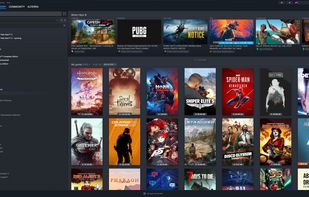
  1. Steam icon
     2447 likes

    Steam provides a digital distribution platform for games with streaming, mod support, and multiplayer capabilities. Developed by Valve, it supports over 100 payment methods, includes Early Access, cloud sync, controller support for major brands, and offers an integrated gaming community.

    66 Steam alternatives

    Cost / License

    • Free
    • Proprietary

    Application types

    Platforms

    • Mac
    • Windows
    • Linux
    • Online
    • Android
    • iPhone
    • Android Tablet
    • Windows Phone
    • iPad
    • Flathub
    • SteamOS
    • Snapcraft
     
    |
    7
    Steam vs Lutris Comments
    Top Positive Comment
    sharpaxee
    -1

    Steam can actually be effectively used as a launcher since non-steam games can be added. It also has support for Proton, allowing many windows games to be played on linux.

    Steam actually has an exceptional controller support as well and it can be configured for any software or game, even non-steam ones.

    Top Negative Comment
    loziniak
    0

    It cannot launch games from other systems, like DOS, consoles etc.

    Guest
    Negative
    0

    they are completely different apps

    Review by a new / low-activity user.
    3 of 7 comments
    • Steam is Free and ProprietaryLutris is Free and Open Source
  2. Heroic is an Open Source Game Launcher for Linux, Windows and macOS (10.15+, won't work properly on High sierra and older versions). Right now it supports launching games from the .

    33 Heroic Games Launcher alternatives

    Cost / License

    Platforms

    • Mac
    • Windows
    • Linux
    • AppImageHub
    • Flathub
     
    |
    1
    Heroic Games Launcher vs Lutris Comments
    Guest
    Positive
    0

    It's less buggy and is very intuitive in how to install your games and view the Stores from Epic and GOG. Your game library is clean and and easy to view, install and play. There's no configuration, or very little, needed in order to play your games. Lutris is very clunky compared. So much so, that I installed Ubi Connection as a non-steam game, installed it through Steam and now launch Ubi-Connect through Steam and don't use Lutris at all. It's that bad.

    Review by a new / low-activity user.
    • Heroic Games Launcher is Free and Open SourceLutris is also Free and Open Source
  3. PlayOnLinux is a graphical frontend for the Wine software compatibility layer which allows Linux and Mac users to install Windows-based video games, Microsoft Office (2000 to 2010), Microsoft Internet Explorer, as well as many other applications.

    46 PlayOnLinux - PlayOnMac alternatives

    Cost / License

    Application type

    Platforms

    • Mac
    • Linux
    • BSD
    • Wine
    • FreeBSD
     
    |
    1
    PlayOnLinux - PlayOnMac vs Lutris Comments
    Guest
    Negative
    -1

    Only runs games for windows.

    Review by a new / low-activity user.
    • PlayOnLinux - PlayOnMac is Free and Open SourceLutris is also Free and Open Source
  4. Retrom icon
     33 likes

    Centralized game library management service, allowing you to host games on one device and connect multiple clients, supporting cross-platform play and emulation. Easily manage emulator profiles, with web client access for metadata and artwork showcase.

    44 Retrom alternatives

    Cost / License

    Application type

    Platforms

    • Mac
    • Windows
    • Linux
    • Self-Hosted
    • Docker
    • Flathub
    • Flatpak
     
  5. Game Jolt icon
     67 likes

    Experience a vibrant community for gamers and creators, offering challenges, rewards, and a shop for collectibles. Share and sell personal creations, explore anime and fan art, connect in a global cosplay realm, and more.

    24 Game Jolt alternatives

    Cost / License

    • Freemium
    • Open Source (MIT)

    Application type

    Platforms

    • Mac
    • Windows
    • Linux
    • Online
    • Android
    • iPhone
    • Android Tablet
    • iPad
     
  6. GameHub icon
     44 likes

    Games library manager. Supports: Steam, GOG, Humble Bundle, Humble Trove, Wine and RetroArch.

    48 GameHub alternatives

    Cost / License

    Alerts

    • Discontinued

    Platforms

    • Linux
    • AppImageHub
    • Flatpak
     
    |
    3
    GameHub vs Lutris Comments
    lounes-tb
    Positive
    1

    GameHub is available an AppImage and Flatpak, that makes it easier to use on some distros.

    Guest
    Positive
    1

    It does give-or-take all what Lutris can do, and it's available both on Flathub and as an AppImage which makes it real easy to install on elementary os and any other Linux system.

    Review by a new / low-activity user.
    Guest
    Positive
    1

    IMO, it's faster than Lutris

    Review by a new / low-activity user.
    • GameHub is Free and Open SourceLutris is also Free and Open Source
  7. CrossOver icon
     76 likes

    Cross-platform utility enables seamless installation and execution of Windows applications on macOS, Linux, and Chrome OS. No Windows license required—facilitates easy app management with a few clicks, eliminates the need for virtual machines and reboots, delivering efficient compatibility layer operation.

    46 CrossOver alternatives

    Cost / License

    • Paid
    • Proprietary

    Application type

    Platforms

    • Mac
    • Linux
    • Android
    • Chrome OS
     
    |
    2
    CrossOver vs Lutris Comments
    Guest
    Negative
    -1

    Used to run windows applications, and windows applications only.

    Review by a new / low-activity user.
    Guest
    Negative
    -1

    Only supports Wine games and even then, for a commercial system, support is little better than the Open Source WINE.

    Review by a new / low-activity user.
    • CrossOver is Paid and ProprietaryLutris is Free and Open Source
  8. Ludo icon
     21 likes

    Ludo is an Emulator Frontend able to run retro video games. Ludo does not emulate the consoles itself, but does it through emulator plugins called libretro cores. Libretro cores are well known emulators (like Snes9x or Genesis Plus GX or PCSX) stripped from their user interface.

    37 Ludo alternatives

    Cost / License

    Application type

    Platforms

    • Mac
    • Windows
    • Linux
     
  9. Pegasus icon
     29 likes

    Pegasus is a graphical frontend for browsing your game library (especially retro games) and launching them from one place. It's focusing on customizability, cross platform support (including embedded devices) and high performance.

    49 Pegasus alternatives

    Cost / License

    • Free
    • Open Source

    Application type

    Platforms

    • Mac
    • Windows
    • Linux
    • Android
    • Raspberry Pi
     
12 of 32 Lutris alternatives