




Heroic Games Launcher
115 likes
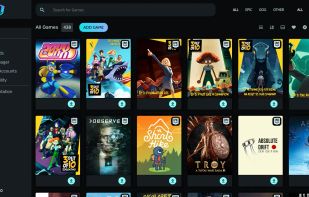
Heroic is an Open Source Game Launcher for Linux, Windows and macOS (10.15+, won't work properly on High sierra and older versions). Right now it supports launching games from the .

Cost / License
- Free
- Open Source (GPL-3.0)
Application typeApplication types
Since
- Since 2021
Updated
- Updated Nov 2026
Releases
- 10 releases last year10 last year



Features
Highlights All activities
Heroic Games Launcher News & Activities
Recent News
- Paul published news article about Heroic Games Launcher
- Mauricio B. Holguin published news article about Heroic Games Launcher
- Paul published news article about Heroic Games Launcher


Recent activities
 Fla added Heroic Games Launcher as alternative to OpenPlay
 stronxyo added Heroic Games Launcher as alternative to Quarter
- added Lightweight as a feature to Heroic Games Launcher
- electrosenpai liked Heroic Games Launcher
- Leafiyan added Heroic Games Launcher as alternative to OpenPlay
 Mikek-4187 added Heroic Games Launcher as alternative to Soju by Didim Labs
- Geosmine liked Heroic Games Launcher
- unnoticed6081 liked Heroic Games Launcher
 radudiaconu added Heroic Games Launcher as alternative to Irori
 Darlene Sonalder added Heroic Games Launcher as alternative to Heronite





The linux setup for everyone (freeware with GUI only and distro recommendations)
THIS LIST HAS BEEN DELETED DUE TO A BUG, SO IT MISSES SOME HONORABLE MENTIONS !
I've been using Linux for a year now. I do use CLI tool and the terminal but I'm super used to GUI and I do understand why you might don't want to bother with Terminal and stuff ! Here is my list of useful tools for beginners on Linux !
The same list for
macOS :
Windows 10 :




Linux MUSTS (Almost All Nice & Modern UI/UX)
A simple list of Applications I use daily, hopefully you haven't seen all of these before. But, in this list you'll generally find apps that look modern, as UI is pretty important to me. I know there aren't too many "Linux with Pretty UI" lists, so here's this one. Let me know if there are any you'd add!



SAY GOODBYE TO BIG COMPANIES WITH THESE ALTERNATIVES
Throughout the years, we have been relying on big companies like Google, Microsoft, Meta and others to give us access to their products to use our computers and phones, communicate on the online web, and store our files. However, as things have gotten worse with the years and the rise of gen-AI only making things worse, people are starting to question if they can even move to new services. However, the journey can be hard and there are so many options that non-tech savvy people are going lose patience and give up.
That is why I made this long and comprehensive list of mostly open-source alternatives to different things from computer OS, social media, to even TV. Many things are easy to move to, others are for more tech-savvy people, and this list doesn't even have all of the available options in any category! However, this is a great first step into trying new things and to slowly move away from big tech. You don't need to do it all at once, go step by step, decide if there are some services you can't stop using and which ones could use a switch and have fun!
Official Links
Install from the command line
flatpak install flathub com.heroicgameslauncher.hgl


Developed by
 Flavio F Lima
Licensing
Open Source (GPL-3.0) and Free product.Written in
Rating
Average rating of 4.8Alternatives
54 alternatives listedNews
3 news articles related to Heroic Games LauncherBadge
Get an embeddable badge for Heroic Games LauncherSupported Languages

AlternativeTo Category
Gaming SoftwareGitHub repository
- 12,629 Stars
- 720 Forks
- 969 Open Issues
- Updated



Comments and Reviews
Play games from epic games store without the shitty launcher
Finally, a replacement to the lackluster vibe coded Epic Games Launcher
i tried lutris and wine for many days but could not run. heroic did it without any complications.
This is my first foray into using game launchers like Steam. I just love the idea of not needing launchers for each and every service. Sometimes my GOG games would not launch from here, so I load them into Steam as a workaround.
Heroic is the easiest appealing way to get Epic Games library to play on Linux with the help from Wine, Proton, and Steam Runtime.
Really great to see an app that helps to install games on Linux and serve as a library of GOG, Epic Games and Amazon Games launcher.
They are also working on fixing or implementing anti-cheat games on Linux, which is a mess.
Thanks devs, your are heroes!
It gives a good UI for Epic Games, and an easy way to download+install the games from there