

LowNotes icon
LowNotes icon

LowNotes

LowNotes is an open-source, local-first Markdown note-taking app for Windows, macOS, and Linux. Built with Tauri, Rust, Svelte, and TypeScript, it offers peer-to-peer sync and real-time collaboration without centralized cloud storage.
LowNotes screenshot 1

Cost / License

Application type

Platforms

  • Mac
  • Windows
  • Linux
2likes
0articles
Save

Features

Properties

  1.  Distraction-free
  2.  Privacy focused
  3.  Support for Themes
  4.  Lightweight
  5.  AI-Powered

Features

  1.  No registration required
  2.  Support for MarkDown
  3.  No Tracking
  4.  Works Offline
  5.  Ad-free
  6.  End-to-End Encryption
  7.  Full-Text Search
  8.  PDF annotation
  9.  Dark Mode
  10.  Portable
  11.  Peer-To-Peer

LowNotes News & Activities

Highlights All activities

Recent activities

LowNotes information

AlternativeTo Categories

File Sharing, Office & Productivity, Security & Privacy

GitHub repository

  •  3 Stars
  •  1 Forks
  •  0 Open Issues
  •   Updated  
View on GitHub

Popular alternatives

View all
LowNotes was added to AlternativeTo by Fábio Henrique Araújo on and this page was last updated .

No comments or reviews, maybe you want to be first?

Official Links

What is LowNotes?

LowNotes is an open-source Markdown note-taking app for Windows, macOS, and Linux. It brings together local storage, peer-to-peer synchronization, and real-time collaboration in a desktop workspace for personal notes, knowledge bases, project documentation, and shared writing. Your notes are stored as ordinary Markdown files in a folder you choose. You can start with an existing collection of .md files, work offline, open your notes in other editors, and back them up using your preferred tools. Synchronization and AI assistance are optional, so you can use LowNotes entirely as a local writing environment. The workspace includes:

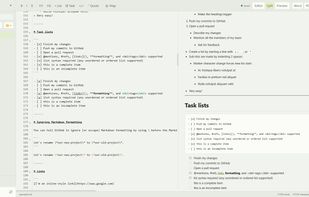
  • Flexible editing: Switch between editor, preview, and split views to write Markdown and see the rendered result side by side.
  • Rich Markdown support: Use task lists, tables, footnotes, code blocks, and Mermaid diagrams.
  • Note organization: Arrange notes in folders, find them through search, and connect ideas with wiki-style links and local Markdown links.
  • Visual connections: Explore relationships between notes through an interactive graph, including links you add manually.
  • Document export: Export notes and assistant drafts to Word (.docx) or PDF.
  • Personalization: Choose light or dark mode, use built-in themes, or create custom color palettes.
  • Multiple languages: Use the interface in English, Portuguese, or Spanish. When you want to work across devices or write with others, pair LowNotes installations to enable encrypted peer-to-peer synchronization and live collaborative editing. Notes remain on the paired devices, without requiring a central server to store your vault. Changes appear in real time while connected, and offline changes are reconciled when devices reconnect. If offline edits diverge, LowNotes preserves both versions for review. An optional AI assistant can search your notes, prepare drafts and plans, and research the web. Use local models through Ollama or LM Studio, or connect a supported remote provider. Drafts are available for review before saving, while conversations and draft history are stored locally for each vault. When using a remote model, prompts and selected note excerpts are sent to your chosen provider. LowNotes is built with Tauri 2, Rust, Svelte 5, TypeScript, and Tailwind CSS. CodeMirror 6 powers the editor, markdown-it and Mermaid render Markdown and diagrams, Yjs and Yrs support CRDT-based collaboration, and Iroh provides encrypted peer-to-peer networking. The project is open source and licensed under the GNU Affero General Public License v3.0 (AGPL-3.0).
