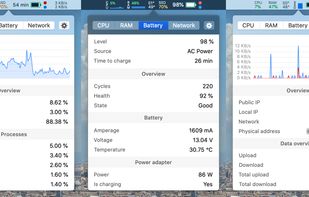
Menu bar tool for macOS shows real-time CPU, GPU, memory, disk, network, battery status, sensor data, fan speed, Bluetooth device info, multi-time zone clocks, customizable widgets, and historical graphs while ensuring privacy.

LoadViz is described as 'Library + macOS app for showing system load' and is an app in the system & hardware category. There are eight alternatives to LoadViz for a variety of platforms, including Mac, Windows, Linux, iPhone and Flathub apps. The best LoadViz alternative is Stats, which is both free and Open Source. Other great apps like LoadViz are iStat Menus, XMeters, Yet Another Framework Interface and iGlance.
Menu bar tool for macOS shows real-time CPU, GPU, memory, disk, network, battery status, sensor data, fan speed, Bluetooth device info, multi-time zone clocks, customizable widgets, and historical graphs while ensuring privacy.

Advanced Mac utility with menubar monitoring for CPU, GPU, memory, disks, network, and sensors, including fan control, S.M.A.R.T status, Bluetooth battery tracking, weather, notifications, and deep customization. Combines multiple stats in a single view while prioritizing privacy.


Visualizes CPU, RAM, disk, and network statistics in the Windows taskbar with a lightweight, battery-friendly design. Offers customizable appearance, quick refresh rates, and continuous monitoring for always-visible resource usage insights on desktop or laptop devices.


YAFI is another GUI for the Framework Laptop Embedded Controller. It is written in Python with a GTK4 Adwaita theme, and uses the CrOS_EC_Python library to communicate with the EC.


macOS and OSX tool showing real-time CPU, memory, network activity, fan speed, and temperature in the menu bar. Highly configurable, with customizable battery notifications, support for light or dark mode, open-source code, and ongoing community-driven updates.

MiniUsage displays various data like CPU usage, amount of network flow, battery status and process names which uses much CPU time in a menubar. It takes little space and can display various data, so it's suitable for notebook.


This compact utility displays real-time CPU, RAM and disk drives usage meters right on the taskbar notification area, or next to the system clock, that is always visible.