Launcher314 icon
Launcher314 icon

Launcher314

 Like

I built this launcher for people to be able to easily access settings and customization all from one screen without having to go on a scavenger hunt to change something simple like row count or font size.
Launcher314 screenshot 1
Launcher314 screenshot 2
+2
Launcher314 screenshot 3

Cost / License

Application type

Since

  • New

Updated

  • Updated Oct 2026

Platforms

  • Android
  • F-Droid
0likes
0articles
Save

Features

Properties

Features

Highlights All activities

Launcher314 News & Activities

Recent activities

Launcher314 information

AlternativeTo Category

OS & Utilities

GitHub repository

  •  180 Stars
  •  17 Forks
  •  74 Open Issues
  •   Updated  
View on GitHub
Launcher314 was added to AlternativeTo by Emin on and this page was last updated .

No comments or reviews, maybe you want to be first?

What is Launcher314?

I built this launcher for people to be able to easily access settings and customization all from one screen without having to go on a scavenger hunt to change something simple like row count or font size. I built this app to help me move to a more secure OS and thought oh, other people can use this too!
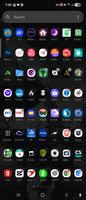
All your data is stored locally on the device, no exuberant permissions required such as internet connection or any data collection libraries (you can check with apps like TrackerControl or apps that will scan libraries for trackers).

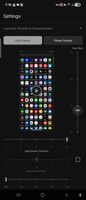
One screen customization with preview windows to view your changes prior to even going into the launcher. Just like most launchers, icons, folders, and everything in the preview areas use bitmaps; while widgets are the only item using Live AndroidView. In the preview section you will see we have multiple ways to customize the launcher with columns & rows being independent of each-other in the Home Screen / App Drawer sections but only being bound by a universal icon size indicator making sure apps and text don't go out of bounds on each-other. In the app drawer you will also see a square check mark box next to the app drawer rows; this selection will switch you between the scroll mode & paged mode drawers and if you scroll further down to the scroll bar/ navigation drop down, you can customize both navigation indicators to you liking. Just above that you will notice an icon text dropdown where you can choose rom various fonts (most popular ones from other Launcher3 forks) & a way to adjust the text size.

Using this app is pretty straight forward and everything is contained in a few screens or less so you spend less time trying to figure out what a selection does or where to find a specific setting and instead just jump right in to customization and setting up the launcher; a feature I felt that most other launchers didn't do well.