Kubebar icon
Kubebar icon

Kubebar

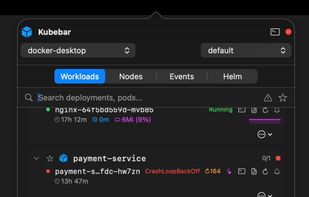
Kubebar is a native macOS and Windows menu-bar / system-tray app for monitoring and managing Kubernetes clusters - pod health at a glance, live logs, one-click restart & scale, Helm, events, port-forwarding, and an optional bring-your-own-key AI assistant.
Kubebar screenshot 1

Cost / License

  • Subscription
  • Proprietary

Platforms

  • Windows  Requires Windows 10 or later. Needs kubectl installed and a kubeconfig; cloud connect uses the provider CLI (az / aws / gcloud / doctl). k9s and an in-pod shell are optional.
  • Mac  Requires macOS 13 (Ventura) or later. Needs kubectl installed and a kubeconfig; cloud connect uses the provider CLI (az / aws / gcloud / doctl). k9s and an in-pod shell are optional.
Kubebar screenshot 1
Kubebar screenshot 2
+3
Kubebar screenshot 3
0likes
0comments
0alternatives
0articles

Features

  1.  Sits in the MenuBar
  2.  Kubernetes
  3.  Kubernetes Monitoring
  4.  Cluster management
  5.  Clustering analysis

Kubebar News & Activities

Highlights All activities

Recent activities

Kubebar information

  • Developed by

    DE flagMarcel Gläser
  • Licensing

    Proprietary and Commercial product.
  • Pricing

    Subscription ranging between $1 and $3 per month.
  • Alternatives

    0 alternatives listed
  • Supported Languages

    • English
    • German
    • French
    • Spanish
    • Italian
    • Polish
    • Portuguese
    • Czech
    • Dutch
    • Danish
    • Swedish
    • Croatian
Kubebar was added to AlternativeTo by marcel_glaeser on and this page was last updated .
No comments or reviews, maybe you want to be first?

What is Kubebar?

Kubebar — Kubernetes in your menu bar.

Kubebar is a fast, native app for macOS and Windows that lives in your menu bar / system tray and lets you monitor and manage Kubernetes clusters without breaking your flow. Instead of constantly switching between terminal, kubectl and web dashboards, you get real-time cluster health one click away.

What it does

  • Cluster health at a glance — a green/yellow/red indicator in the menu bar; spot CrashLoopBackOff and unhealthy pods instantly.
  • Workloads — Deployments, StatefulSets and DaemonSets with pod status, restart counts and live CPU/memory usage (with history sparklines).
  • Pod logs — live streaming viewer with search, syntax highlighting, copy & save.
  • One-click actions — restart pods, scale deployments, rollout restart/undo, port-forward, view & edit YAML.
  • In-pod shell & k9s — open a shell or k9s in an embedded terminal.
  • Helm — browse releases, view values & history, roll back or uninstall.
  • Live event stream — warnings only or all events, with severity at a glance.
  • Node operations — cordon, drain and inspect nodes.
  • AI assistant (bring your own key) — explain logs, diagnose crashing pods, translate kubectl errors and get right-sized CPU/memory recommendations, using your own Anthropic, OpenAI or Ollama key. Secrets are masked before anything is sent; with Ollama it stays fully local.
  • Notifications — desktop alerts for pod crashes, scaling and high resource usage.
  • Filters & focus — search, a watchlist for the workloads you care about, a "problems only" filter, and per-pod or per-group notification muting.

Works everywhere Local clusters (Docker Desktop, etc.) and managed clouds — Azure AKS, AWS EKS, Google GKE and DigitalOcean DOKS. Multi-cluster with quick context switching and auto-follow of your active context. Localized in 40 languages.

Native & private Built natively for each platform (no Electron). Your cluster data never leaves your machine; AI calls go only to the provider you choose with your own key.

Pricing Commercial app with a free 14-day trial — no account needed. ? https://kubebar.app

Official Links