Davit icon
Davit icon

Davit

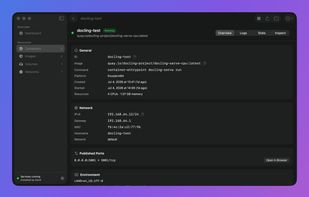
Native macOS app enabling Linux containers on Apple silicon with direct connection to Apple’s daemon, live stats, interactive terminal, file system access, registry login, and editable platform settings. No Electron, browser, or admin access required.
Davit screenshot 1

Cost / License

  • Free
  • Open Source (MIT)

Application type

Platforms

  • Mac
  • Homebrew
1like
0comments
0articles

Features

Properties

  1.  Privacy focused

Features

  1.  Ad-free
  2.  Container Virtualization
  3.  Dark Mode
  4.  No registration required
  5.  Works Offline
  6.  No Tracking
  7.  Apple Silicon support
  8.  Virtualization
  9.  Container Orchestration

Davit News & Activities

Highlights All activities

Recent activities

Davit information

  • Developed by

    US flagWouter de Bie
  • Licensing

    Open Source (MIT) and Free product.
  • Written in

  • Alternatives

    30 alternatives listed
  • Supported Languages

    • English

AlternativeTo Category

System & Hardware

GitHub repository

  •  374 Stars
  •  7 Forks
  •  5 Open Issues
  •   Updated  
View on GitHub
Davit was added to AlternativeTo by Paul on and this page was last updated .
No comments or reviews, maybe you want to be first?

What is Davit?

A fully native macOS app for Apple's container platform — run Linux containers on Apple silicon, no Docker Desktop required.

Everything you'd expect. Nothing you don't.

Davit talks directly to Apple's open-source container daemon over XPC — the same wire path the CLI uses. No Electron, no web views, no background agents of its own.

  • Containers: Start, stop, restart and delete with live CPU, memory and IP on every row. Streaming logs with follow & boot mode, live stat charts, and raw config inspection.
  • One-click terminal: Open an interactive shell in any running container, straight into Terminal or iTerm — over the native API, no CLI needed.
  • Edit & Recreate: Containers are immutable — so Davit prefills a new one from the old config with the image's entrypoint and env subtracted, letting you change ports, env vars, mounts or resources in seconds.
  • In-container files: Browse any running container's filesystem right in the app — navigate folders, download files to your Mac, upload or delete — over the native API, no docker cp incantations.
  • Images, volumes, networks: Pull with live progress, run from any image, tag, prune. Create sized volumes and custom subnets. See what's in use before you delete it.
  • Registry logins: Sign in to Docker Hub, ghcr.io, quay.io or any registry to pull private images. Credentials are verified on the spot and stored in your login keychain — shared with the container CLI, so both see them.
  • Platform settings, editable: Default CPU/memory for new containers, registry, DNS, builder resources — edited in the app, validated by the platform's own config loader, saved as clean TOML overrides.
  • Installs the platform for you: No container platform installed? Davit downloads Apple's signed installer, verifies it, and sets everything up in your user Library — no administrator rights needed. It can add the container CLI to your shell, too.

Native, down to the pixels.

Built entirely in SwiftUI. Menu bar quick actions, a Dock icon only when you want one, and live charts that don't spin up a browser to render.

Official Links
