
Knogra icon
Knogra icon

Knogra

Browser-based knowledge graph editor — one graph, many focused scenes, animated transitions, AI-assisted. Local-first, no account.
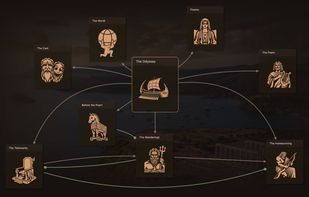
Top scene of The Odyssey graph — the poem's main divisions as illustrated nodes; click any one to travel into its own scene.

Cost / License

  • Free
  • Open Source (MIT)

Application type

Platforms

  • Online
2likes
0articles

Features

Properties

  1.  Distraction-free
  2.  Lightweight
  3.  Support for Themes
  4.  Privacy focused
  5.  Local-First
  6.  AI-Powered

Features

  1.  Dark Mode
  2.  Support for MarkDown
  3.  Knowledge Management
  4.  Mind Mapping
  5.  No registration required
  6.  Hierarchical Structure
  7.  Works Offline
  8.  Ad-free
  9. LaTeX icon  Support for LaTeX
  10.  No Coding Required
  11.  Concept Mapping
  12.  Offline

Knogra News & Activities

Highlights All activities

Recent activities

  • Iana reviewed Knogra  

    It's good for mapping large subjects where standard mind-mapping tools become too messy to use. The app splits a large map into sub-maps that you travel one by one, and the transitions are fun. It also lets you fine-tune the views quite flexibly — size, shapes, colours — and it's all done very quickly. It's very much a shortcut/keyboard-oriented app, so if you like quick actions this one is worth trying. I didn't check the AI as I didn't want to bother with API keys, but it seems perfectly...

  • ebuyakin added Lightweight as a feature to Knogra
  • ebuyakin added Distraction-free as a feature to Knogra
  • Iana liked Knogra
  • ebuyakin A comment was removed from Knogra
  • ebuyakin liked Knogra
  • ebuyakin added Knogra
  • TheBrain icon
    ebuyakin added Knogra as alternative to TheBrain, Xmind, MindMeister and MindNode + 15 similar activities

Knogra information

AlternativeTo Categories

Office & ProductivityAI Tools & Services

GitHub repository

  •  1 Stars
  •  0 Forks
  •  0 Open Issues
  •   Updated  
View on GitHub

Popular alternatives

View all

Our users have written 1 comments and reviews about Knogra, and it has gotten 2 likes

Knogra was added to AlternativeTo by ebuyakin on and this page was last updated .

Comments and Reviews

   
Iana
0

It's good for mapping large subjects where standard mind-mapping tools become too messy to use. The app splits a large map into sub-maps that you travel one by one, and the transitions are fun. It also lets you fine-tune the views quite flexibly — size, shapes, colours — and it's all done very quickly. It's very much a shortcut/keyboard-oriented app, so if you like quick actions this one is worth trying. I didn't check the AI as I didn't want to bother with API keys, but it seems perfectly usable without it. Also interesting: there are a number of pre-made maps on the site, and they seem to come with AI commentary already.

Review from a new or low-activity account — shown here, but not counted in the app rating.

Official Links

What is Knogra?

Knogra is a browser-based tool for mapping a subject you want to learn or think through — a textbook, a scientific theory, a body of technology, a historical period, a classification — as a knowledge graph you travel rather than squint at.

Instead of rendering one enormous diagram, Knogra breaks the graph into scenes: focused views of a node and its neighbourhood, each with its own layout. Clicking any node morphs smoothly into that node's scene — shared ideas drift to their new positions rather than the screen jumping — so a several-hundred-node subject stays legible at every step and the movement itself encodes the structure spatially. A concept can appear in several scenes at once instead of living in one folder.

Nodes are visual objects, not labelled boxes: shape, colour and layout are yours, with a LaTeX equation rendered in the node body or an SVG illustration inside it (20+ presets). Typed, directed edges express real relationships (part of, special case of, causes, enables) rather than a single generic link. Paths save any route through the scenes as a guided walkthrough for revision or teaching. Quiz mode hides a share of the nodes and asks you to reconstruct the map.

A built-in AI assistant reads the graph's structure — nodes and connections both — answers questions in the context of the node you're focused on, keeps a separate conversation per node, and suggests nodes and connections to add. Bring your own API key (Google Gemini directly, or any model via OpenRouter); calls go straight to the provider and the key stays on your computer.

Import a Markdown file with a Mermaid flowchart and it becomes navigable, drill-down scenes, notes and equations included; export any graph as plain JSON. Everything stays in your browser: no account, no server, no tracking, works offline. Knogra is open source (MIT) and comes with a library of eight complete graphs — Quantum Mechanics, Calculus, The Odyssey, Modern AI Technology, Internet & the Web, Chess Openings, GICS Industry Classification, and a Welcome tutorial — each an editable live workspace, so you can see what a full subject map looks like before building your own.

Knogra Videos
