
Igidu icon
Igidu icon

Igidu

 Like

Mac gaming utility for supported peripheral DPI, lighting and sound controls; DualSense Edge paddle and onboard profile editing; adjustable mouse behavior; and local MP4 gameplay capture with manual recording or a rolling replay buffer.
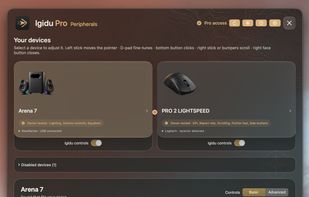
Supported peripheral controls in Igidu.

Cost / License

  • Freemium (Pay once)
  • Proprietary

Application type

Since

  • New

Platforms

  • Mac  Apple silicon; macOS 14+. Microphone capture requires macOS 15+.
0likes
0articles
Save

Features

Features

Highlights All activities

Igidu News & Activities

Recent activities

Igidu information

  • Developed by

    US flagJesse Miller
  • Licensing

    Proprietary and Freemium product.
  • Pricing

    One time purchase (perpetual license) that costs $15 + free version with limited functionality.
  • Alternatives

    41 alternatives listed
  • Badge

    Get an embeddable badge for Igidu
  • Supported Languages

    • English
Igidu was added to AlternativeTo by Igidu on and this page was last updated .

No comments or reviews, maybe you want to be first?

What is Igidu?

Igidu brings supported gaming peripheral controls, DualSense Edge customization, gameplay recording and replay, and Windows-style mouse options together on Mac.

Peripheral controls include device-specific DPI, lighting and sound settings. DualSense Edge tools include onboard profile and paddle editing, plus a floating Fn profile panel. Mouse options include linear pointing, traditional wheel scrolling and keeping Shift-wheel scrolling vertical while preserving trackpad behavior.

Free includes manual recording up to 1080p/30, the launcher and everyday Companion controls. Pro adds advanced controller and peripheral customization, mouse behavior options, recording settings up to 4K/60 and a rolling replay history of 60, 120 or 180 seconds. Replay must be enabled before the moment you want to save. Completed clips save locally as MP4 files.

Companion provides convenient access to music, volume and capture controls during a gaming session. A controller is optional for recording, replay and Companion.

Requires an Apple silicon Mac with macOS 14 or later. Microphone capture requires macOS 15 or later. Device controls depend on model, connection and permissions. Capture quality and performance depend on the source window, Mac and workload.

Pro costs US$14.99 once for Mac 1.x on up to two personal Macs, with an optional 72-hour no-card trial.