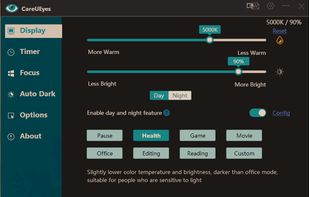
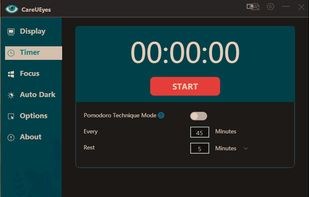
CareUEyes is a very simple but useful program when it is about your eye care. The program comes with a very simple and clean interface and needs to technical knowledge. Even a novice computer user can download and use it easily.


Gamma Dimmer is described as 'Dim any screen and keep color accuracy' and is a Screen Dimmer. There are more than 50 alternatives to Gamma Dimmer for a variety of platforms, including Windows, Mac, Linux, Wayland and Android apps. The best Gamma Dimmer alternative is f.lux, which is free. Other great apps like Gamma Dimmer are Redshift, Twinkle Tray, Solace and Dimly.
CareUEyes is a very simple but useful program when it is about your eye care. The program comes with a very simple and clean interface and needs to technical knowledge. Even a novice computer user can download and use it easily.


Vivid is a software that enables users to amplify the brightness of their MacBook Pro and Pro Display XDR, system-wide, utilizing standard Apple APIs.


To schedule Night Light so it turns on automatically, select Start > Settings > System > Display > Night light > Night light settings.

Unlock your displays on your Mac! Smooth scaling, HiDPI unlock, XDR/HDR extra brightness upscale, DDC, brightness and dimming, virtual screens, PIP and lots more!.

Form 1 Hour Software by skrommel, it can dim the screen by applying a transparent gray layer on top of your opened applications

Free software for eye protection and more! It protects your eyes while you are working on the computer. Eye Saver has three main functions: blue light filter; eliminates the invisible flickering of the display backlight; reminds you to take breaks;


NightTone makes your screen more comfortable, enjoyable and healthier by shifting the colors of your display to a warmer, eye-friendly palette. It makes you sleep and feel better.


Brightness Controller allows you to software control Brightness, R, G and B of your Primary and Secondary Display in Linux.


iBrightness Tray is a little bit of a swiss army knife display tool as adjusting the brightness of your screen is just one of three main functions it has. The other two are turning on your screensaver at the click of a button and also the ability to turn off the display...

ControlMyMonitor allows you view and modify the settings of your monitor (Also known as 'VCP Features'), like brightness, contrast, sharpness, red/green/blue color balance, OSD Language, Input Port (VGA , DVI , HDMI ) and more...